# GCP(Google Cloud Platform)VMインスタンス
**URL:** https://forum.ficusonline.com/t/topic/300
**Category:** Server
**Created:** [2019 年 5 月 24 日午後 11:47 UTC](https://forum.ficusonline.com/t/topic/300 "2019-05-24T23:47:56Z")
**Posts on this page:** 3
**Page:** 1
### Author:  [@tk-fuse](https://forum.ficusonline.com/u/tk-fuse)
#### Post date: [2019 年 5 月 24 日午後 11:47 UTC](https://forum.ficusonline.com/t/topic/300/1 "2019-05-24T23:47:56Z")
現在GCPのVM(仮想マシーン)インスタンスへサーバ環境を移行検討中。トライアルとして新規登録(クレジットカード登録が必要ですが、あくまで個人認証としてのみ使用するそうです)すると$300相当のクレジットが適用されるので、小規模サーバであれば最大で1年間は実質無料で利用できます(カード会社からは一切請求されることはありません)。AWSなど他のVMサービスと比較して、トライアル経過後に自動的に有料サービスに移行することがないことと、トライアルでも、よりグレードの高いサービスも選択できるのでGCPを試用することにしました。
同グレードのVMサービスを選択した場合、他社のサービスと比較して割安です(コンピュータリソースの余剰部分を利用するプリエンティティブVMインスタンスとすることで更に安くなります)。
> **[クラウド コンピューティング サービス | Google Cloud](https://cloud.google.com/)**
>
> データ管理、ハイブリッド クラウドとマルチクラウド、AI と ML など、Google のクラウド コンピューティング サービスで、あらゆるビジネス上の課題に取り組みましょう。
---
### Author:  [@tk-fuse](https://forum.ficusonline.com/u/tk-fuse)
#### Post date: [2019 年 5 月 25 日午前 12:03 UTC](https://forum.ficusonline.com/t/topic/300/2 "2019-05-25T00:03:33Z")
GCPのVMインスタンス(仮想マシーン)のOSとしてUbuntu18.04を導入。メモリー1.6GのVMインスタンスを選択しましたがデフォルトではswapメモリが設定されていないため、以下手順でswapメモリを設定します(パフォーマンスが犠牲になるため、出来ればswapは使用しない方がいいです)。
> **[Adding Swap to Google Compute Engine | BadlyWired.com](https://badlywired.com/2016/08/adding-swap-google-compute-engine/)**
>
> By default Google Compute Engine (Debian) doesn’t come with any swap space. If you have periodic programs that eat a bit more memory (like my backups do) then instead on just adding more physical…
ブラウザのGCP画面でssh接続のターミナルを起動
```auto
$ sudo fallocate -l 4G /swapfile
$ sudo chmod 600 /swapfile
$ sudo mkswap /swapfile
$ sudo swapon /swapfile
$ sudo swapon -s
```
/etc/fstabに以下追加
```auto
/swapfile none swap sw 0 0
```
**swapfile削除**
swapoff後swapfileを削除します。アクセス権が600なので7XXに変更します。
```auto
$ sudo swapoff /swapfile
$ sudo chmod 777 /swapfile
$ sudo rm /swapfile
```
swapfileのサイズ変更は既存のswapfileを削除後行います。
fallocateから再度実行してサイズ変更して下さい。
❗ **2021/11/05:追記)**
> **fallocate** による方法は、OSが直接アクセスできるファイルシステムで **swap** 領域を確保するため推奨されていません。 **dd** による方法を選択しましょう。
>
**Ubuntu Swap Help**
> **[SwapFaq - Community Help Wiki](https://help.ubuntu.com/community/SwapFaq)**
**fallocateによる方法**
```auto
$ sudo fallocate -l 1g /mnt/1GiB.swap
```
fallocate size suffixes: g = Giga, m = Mega, etc. (See man fallocate).
**ddによる方法**
fallocateによる方法を提示していますが、ddを推奨します。
If fallocate fails or it not available, you can use dd:
```auto
$ sudo dd if=/dev/zero of=/mnt/1GiB.swap bs=1024 count=1048576
```
- 1GiB = 1024 MiB = 1048576 KiB
- 2GiB = 2 × 1048576 = 2097152 KiB
We need to set the swap file permissions to 600 to prevent other users from being able to read potentially sensitive information from the swap file.
```auto
$ sudo chmod 600 /mnt/1GiB.swap
```
Format the file as swap:
```auto
$ sudo mkswap /mnt/1GiB.swap
```
Enable use of Swap File
```auto
$ sudo swapon /mnt/1GiB.swap
```
The additional swap is now available and verified with: cat /proc/swaps
Enable Swap File at Bootup
Add the swap file details to /etc/fstab so it will be available at bootup:
```auto
$ echo '/mnt/1GiB.swap swap swap defaults 0 0' | sudo tee -a /etc/fstab
```
Swapサイズ確認
```auto
$ cat /proc/swaps
Filename Type Size Used Priority
/home/swapfile file 1048576 1048576 -1
```
```auto
$ free -h
total used free shared buff/cache available
Mem: 15G 9.3G 454M 4.0G 5.8G 1.9G
Swap: 1.0G 1.0G 0B
```
Disable and Remove a Swap File
Disable the swap file from the running system and the delete it:
```auto
$ sudo swapoff /mnt/1Gib.swap
$ sudo rm /mnt/1Gib.swap
```
Remove the swap file details from fstab:
```auto
$ gksudo gedit /etc/fstab
```
Removing the swap file line
**`/mnt/1GiB.swap swap swap defaults 0 0`**
* * *
#### swapの無効化
> **[How to turn off swap memory on Ubuntu](https://pimylifeup.com/ubuntu-turn-off-swap/)**
>
> Disabling swap to reduce disk usage
一時的に無効にする場合: `-a`オプションでswapメモリー全消去
注)再起動後に再びswapは有効になります。
```auto
$ sudo swapoff -a
```
完全無効化
```auto
$ sudo nano /etc/fstab
#/swapfile none swap sw 0 0 ---> コメントアウトして下さい
```
---
### Author:  [@tk-fuse](https://forum.ficusonline.com/u/tk-fuse)
#### Post date: [2019 年 6 月 1 日午前 2:11 UTC](https://forum.ficusonline.com/t/topic/300/3 "2019-06-01T02:11:01Z")
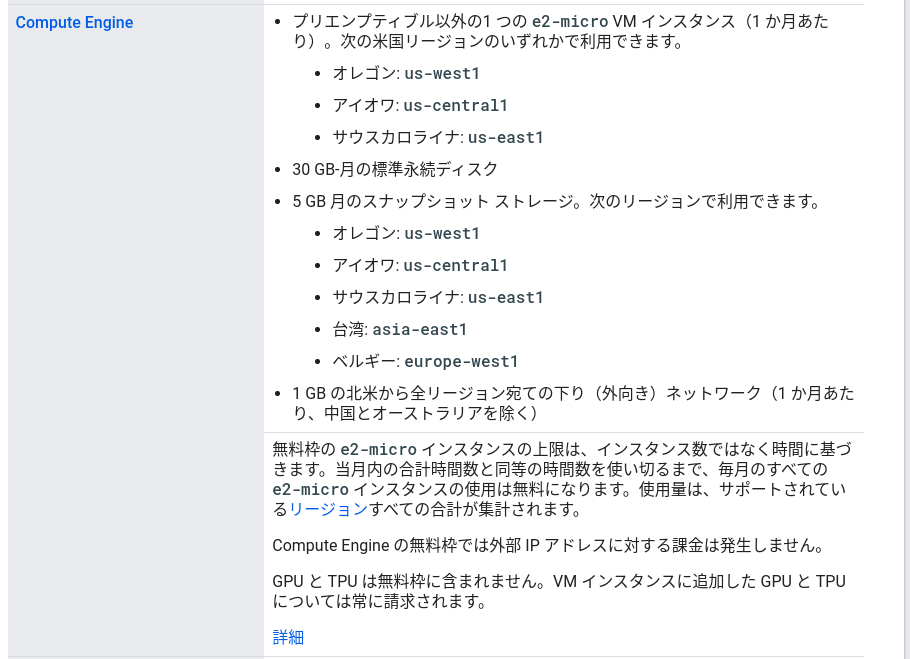
GCPの料金設定はリージョン(地域)によって異なります。米国のアイオワ、オレゴン、サウスカロライナなどが最安となっています。
[https://cloud.google.com/compute/pricing](https://cloud.google.com/compute/pricing)
以下USリージョンのコンピュータエンジンe2-microはフリーです。但しデータ転送については料金が発生します。
> **[無料のクラウド機能とトライアル特典 | Google Cloud Free Program | ...](https://docs.cloud.google.com/free/docs/free-cloud-features?hl=ja)**
>
> Google Cloud トライアル特典に含まれる無料のクラウド機能と、アカウントをアップグレードする方法の詳細について説明します。