# OpenWRTによるルータ機能拡張(AP+STAモード、TP-LINK Archer C6)
**URL:** https://forum.ficusonline.com/t/topic/435
**Category:** Linux
**Created:** [2021 年 11 月 18 日午前 8:08 UTC](https://forum.ficusonline.com/t/topic/435 "2021-11-18T08:08:26Z")
**Posts on this page:** 7
**Page:** 1
### Author:  [@tk-fuse](https://forum.ficusonline.com/u/tk-fuse)
#### Post date: [2021 年 11 月 18 日午前 8:08 UTC](https://forum.ficusonline.com/t/topic/435/1 "2021-11-18T08:08:26Z")
安価なWifiルータである **TP-LINK Archer C6** の **ステーションモード** と **アクセスポイントモード** を有効化するため、 **OpenWRT** を導入します。ルータは、モバイル端末のテザリングモード下でクライアント(ステーションモード)として動作すると同時に、アクセスポイントとしての機能も有します。(注:日本国内では電波法の関係上導入は出来ません)
テザリング端末経由で直接ネットに繋げることもできますが、ルータによるワンクッションを置くことで、より細かな通信制御(ポート選択、ファイヤーウォール設定など)が行えるようになります。

## ファームウェアのインストール
**OpenWRT対応モデル TP-LINK**
> **[\[OpenWrt Wiki\] TP-Link](https://openwrt.org/toh/tp-link/start)**
**OpenWRT Archer C6**
国内で導入する場合は **EU版** をダウンロードして下さい。
> **[\[OpenWrt Wiki\] TP-Link Archer C6 v2](https://openwrt.org/toh/tp-link/archer_c6_v2)**
**Archer C6 v2**
> **[AC1200 Wireless MU-MIMO Gigabit Router](https://www.tp-link.com/en/home-networking/wifi-router/archer-c6/v2/)**
>
> Archer C6, with 4 external antennas and gigabit port, delivers WiFi to every corner of your home, so you enjoy smooth video streaming and gaming.
**重要)PCとルータ(LANポート)は予めLANケーブルで繋げて下さい。**
詳細メニューからファームウェアのアップグレードを選択、ダウンロードしたファイルを指定して読み込ませます(5分程度の時間がかかります。電源はOFFにしないで下さい)。
## 管理画面による設定
**192.168.1.1** にアクセスすると **OpenWRT** の管理画面が表示されます。
設定する項目は **Network** の **Interfaces** と **Wireless** です。
**Interfaces** の項目より、下図3つのインターフェイスを用意します( **LAN, WAN, WAN6** )。

次に **Wireless** の項目で、 **Radio0** または **Radio1** の **Scan** ボタンを押してテザリング端末を選択( **Join Network** )、 **WPA Passphrase** を入力して **Submit** ボタンを押して登録します。


上記登録した端末の **Edit** ボタンを押して、 **Mode:Client** とします。 **Network** には **wan, wan6** を指定します。

最後に **Wireless** の **Radio0( 802.11nac)** と **Radio1( 802.11bgn)** の両方の **Add** ボタンを押してルータを **Mode:Access Point** として登録します。 **Network** には **lan** を指定します。
**SSID** は任意ですが、デフォルトの **‘OpenWRT’** を変更する場合には、 **System—\>Hostname** も併せて変更した方が良いでしょう。
> **注)** Operating frequencyの箇所の周波数レンジは、アクセスポイントとステーションモードで折半するように設定して下さい **( `802.11bgn` の場合は `20MHz` に設定)** 。

**参考**
**Connect to client Wi-Fi network**
> **[\[OpenWrt Wiki\] Connect to client Wi-Fi network](https://openwrt.org/docs/guide-user/network/wifi/connect_client_wifi)**
---
### Author:  [@tk-fuse](https://forum.ficusonline.com/u/tk-fuse)
#### Post date: [2021 年 12 月 7 日午前 2:48 UTC](https://forum.ficusonline.com/t/topic/435/2 "2021-12-07T02:48:57Z")
[https://homenetworkadmin.com/what-is-beacon-interval/](https://homenetworkadmin.com/what-is-beacon-interval/)
| Beacon Interval | Lower (More Beacons) | Higher (More Beacons) |
| --- | --- | --- |
| Throughput | Less | More |
| Access Point Scanning | Shorter | Longer |
| Client Battery Life | Lower | Higher |
---
### Author:  [@tk-fuse](https://forum.ficusonline.com/u/tk-fuse)
#### Post date: [2021 年 12 月 23 日午前 2:44 UTC](https://forum.ficusonline.com/t/topic/435/3 "2021-12-23T02:44:04Z")
# How to configure WDS function on TP-Link Wireless Routers(green UI)
> **[How to configure WDS function on TP-Link Wireless Routers(green UI)](https://www.tp-link.com/us/support/faq/227/)**
>
> How to configure WDS function on TP-Link Wireless Routers(green UI)
---
### Author:  [@tk-fuse](https://forum.ficusonline.com/u/tk-fuse)
#### Post date: [2022 年 9 月 29 日午前 7:01 UTC](https://forum.ficusonline.com/t/topic/435/4 "2022-09-29T07:01:32Z")
## DNS and DHCP configuration /etc/config/dhcp
> **[\[OpenWrt Wiki\] DHCP and DNS configuration /etc/config/dhcp](https://openwrt.org/docs/guide-user/base-system/dhcp)**
`Network` → `DHCP and DNS` → `Static Leases` リース時間フォーマット : `12h, 30m`
```auto
`leasetime` string yes `12h` Specifies the lease time of addresses handed out to clients, for example `12h` or `30m`
```
---
### Author:  [@tk-fuse](https://forum.ficusonline.com/u/tk-fuse)
#### Post date: [2023 年 2 月 17 日午前 7:59 UTC](https://forum.ficusonline.com/t/topic/435/5 "2023-02-17T07:59:21Z")
## Client Mode (IPv6)
① クライアントモードのルータ(Archer C6)
② ①が接続している親機
①のインターフェイスをリレーモードにすることで、①に接続しているPCに②からIPv6のIPアドレスを割当てることが可能です。
> **[How to setup IPV6 in Client mode?](https://forum.openwrt.org/t/how-to-setup-ipv6-in-client-mode/132542)**
>
> I'm new to openwrt & have a router (WNDR3700v2) that I'd like to use as a wireless bridge, to connect a couple of wired devices to wifi and the internet. I've installed the latest openwrt (21.02.3). On a fresh install I can scan and join the...
クライアントモードで親機に接続すると下記のインターフェイス(WWAN)が新規に作成されます。
DHCP Serverとしての役割は無効にし、IPv6アドレスの割当てはリレーモードにすることで親機に担わせます。
この状態では上りは`IPv6`、下りは`IPv4`となるので、新たなIPv6インターフェイスである **WWAN6** を追加します。
> **[Relay single /64 IPv6 as wireless client](https://forum.openwrt.org/t/relay-single-64-ipv6-as-wireless-client/97538)**
>
> Hi everybody! Let me start by saying, I only know enough IPv6 to be dangerous but would really like to have it setup in this use case. My use case: A portable LAN for use within another LAN (yes purposeful double NAT) so that I may connect...


IPv4アドレスの割当ては①からとなります。

新たなIPv6インターフェイスWWAN6の追加

ファイヤーウォールの設定

DHCPの設定


接続した端末から`ping6`コマンドによる上下通信の確認
```auto
$ ping6 google.com
PING google.com(kix07s06-in-x0e.1e100.net (2404:6800:400a:80e::200e)) 56 data bytes
64 bytes from kix07s06-in-x0e.1e100.net (2404:6800:400a:80e::200e): icmp_seq=1 ttl=115 time=13.2 ms
64 bytes from kix07s06-in-x0e.1e100.net (2404:6800:400a:80e::200e): icmp_seq=2 ttl=115 time=9.61 ms
64 bytes from kix07s06-in-x0e.1e100.net (2404:6800:400a:80e::200e): icmp_seq=3 ttl=115 time=10.3 ms
64 bytes from kix07s06-in-x0e.1e100.net (2404:6800:400a:80e::200e): icmp_seq=4 ttl=115 time=9.65 ms
^C
--- google.com ping statistics ---
4 packets transmitted, 4 received, 0% packet loss, time 3004ms
rtt min/avg/max/mdev = 9.612/10.674/13.163/1.460 ms
```
ルータにSSH接続して上記DHCP設定事項の確認。
```auto
$ ssh root@192.168.x.x
# ls /etc/config
dhcp dropbear firewall luci network rpcd system ubootenv ucitrack uhttpd wireless
# cat /etc/config/dhcp
config dnsmasq
option domainneeded '1'
option boguspriv '1'
option filterwin2k '0'
option localise_queries '1'
option rebind_protection '1'
option rebind_localhost '1'
option local '/lan/'
option domain 'lan'
option expandhosts '1'
option nonegcache '0'
option authoritative '1'
option readethers '1'
option leasefile '/tmp/dhcp.leases'
option resolvfile '/tmp/resolv.conf.d/resolv.conf.auto'
option nonwildcard '1'
option localservice '1'
option ednspacket_max '1232'
config dhcp 'lan'
option interface 'lan'
option start '100'
option limit '150'
option leasetime '12h'
option dhcpv4 'server'
option ra 'relay'
option dhcpv6 'relay'
option ndp 'relay'
config dhcp 'wan'
option interface 'wan'
option ignore '1'
config odhcpd 'odhcpd'
option maindhcp '0'
option leasefile '/tmp/hosts/odhcpd'
option leasetrigger '/usr/sbin/odhcpd-update'
option loglevel '4'
config dhcp 'wwan'
option interface 'wwan'
option ignore '1'
option master '1'
option ra 'relay'
option dhcpv6 'relay'
option ndp 'relay'
config dhcp 'WWAN6'
option interface 'WWAN6'
option ignore '1'
option ra 'relay'
option dhcpv6 'relay'
option ndp 'relay'
```
---
### Author:  [@tk-fuse](https://forum.ficusonline.com/u/tk-fuse)
#### Post date: [2023 年 2 月 24 日午前 1:48 UTC](https://forum.ficusonline.com/t/topic/435/6 "2023-02-24T01:48:11Z")
## Wi-Fi extender / repeater / bridge configuration
本機を親機のクライアントとして接続するのではなく、親機とリレー接続するための設定方法です。
> **[\[OpenWrt Wiki\] Wi-Fi Extender/Repeater with relayd](https://openwrt.org/docs/guide-user/network/wifi/relay_configuration)**
- **`Configure static IP address on wwan interface`** セクションで静的`IPv4`アドレスの設定をする場合には、親ルータの`DHCP`サーバから割当てられたアドレスとは異なるものを指定して下さい。
- 拡張パッケージ **`luci-proto-relay`** のインストールが必要です(バックアップから復元する際は、この拡張パッケージがインストールされていない状態です。復元後にルータの設定画面にアクセスできない場合は、端末の設定でデフォルトゲートウェイ192.168.1.1と任意のIPv4アドレス192.168.1.xxを指定して接続して下さい)。
- このリレー接続設定はIPv4アドレスのみの対応です。親機からIPv6アドレスを割当てるためには、新規インターフェイス **`WWAN6`** を作成する必要があります(作成手順は上記記事のWWAN6と同じです)。
下図右側ルータ(親機)に子機(ルータ)はリレー接続しています。子機に接続された端末のIPは親機のDHCPサーバから割当てられます(IPv4アドレスのみ対応)。

### ルータ設定ファイル(DHCP)
`/etc/config/dhcp`
```auto
config dnsmasq
option domainneeded '1'
option boguspriv '1'
option filterwin2k '0'
option localise_queries '1'
option rebind_protection '1'
option rebind_localhost '1'
option local '/lan/'
option domain 'lan'
option expandhosts '1'
option nonegcache '0'
option authoritative '1'
option readethers '1'
option leasefile '/tmp/dhcp.leases'
option resolvfile '/tmp/resolv.conf.d/resolv.conf.auto'
option nonwildcard '1'
option localservice '1'
option ednspacket_max '1232'
config dhcp 'lan'
option interface 'lan'
option start '100'
option limit '150'
option leasetime '12h'
option dhcpv4 'server'
option ignore '1'
option ra 'relay'
option dhcpv6 'relay'
option ndp 'relay'
config odhcpd 'odhcpd'
option maindhcp '0'
option leasefile '/tmp/hosts/odhcpd'
option leasetrigger '/usr/sbin/odhcpd-update'
option loglevel '4'
config dhcp 'wwan'
option interface 'wwan'
option start '100'
option limit '150'
option leasetime '12h'
option master '1'
option ra 'relay'
option dhcpv6 'relay'
op **tion ndp 'relay'**
config dhcp 'repeater_bridge'
option interface 'repeater_bridge'
option ignore '1'
option ra 'relay'
option dhcpv6 'relay'
option ndp 'relay'
config dhcp 'WWAN6'
option interface 'WWAN6'
option ignore '1'
option ra 'relay'
option dhcpv6 'relay'
option ndp 'relay'
```
**`WWAN6`** のゲートウェイIPアドレスを、親ルータのIPアドレス(プロバイダのIPv6アドレス)とするためには下図の **`Routing`** で設定します。


> **[Routing Management - \[OpenWrt Wiki\] IPv6 configuration](https://openwrt.org/docs/guide-user/network/ipv6/configuration#routing_management)**
>
> See also: Static IPv6 routes, IPv6 routing example, IPv4/IPv6 transitioning, IPv6 extras, IPv6 Troubleshooting
---
### Author:  [@tk-fuse](https://forum.ficusonline.com/u/tk-fuse)
#### Post date: [2024 年 4 月 10 日午前 11:27 UTC](https://forum.ficusonline.com/t/topic/435/8 "2024-04-10T11:27:50Z")
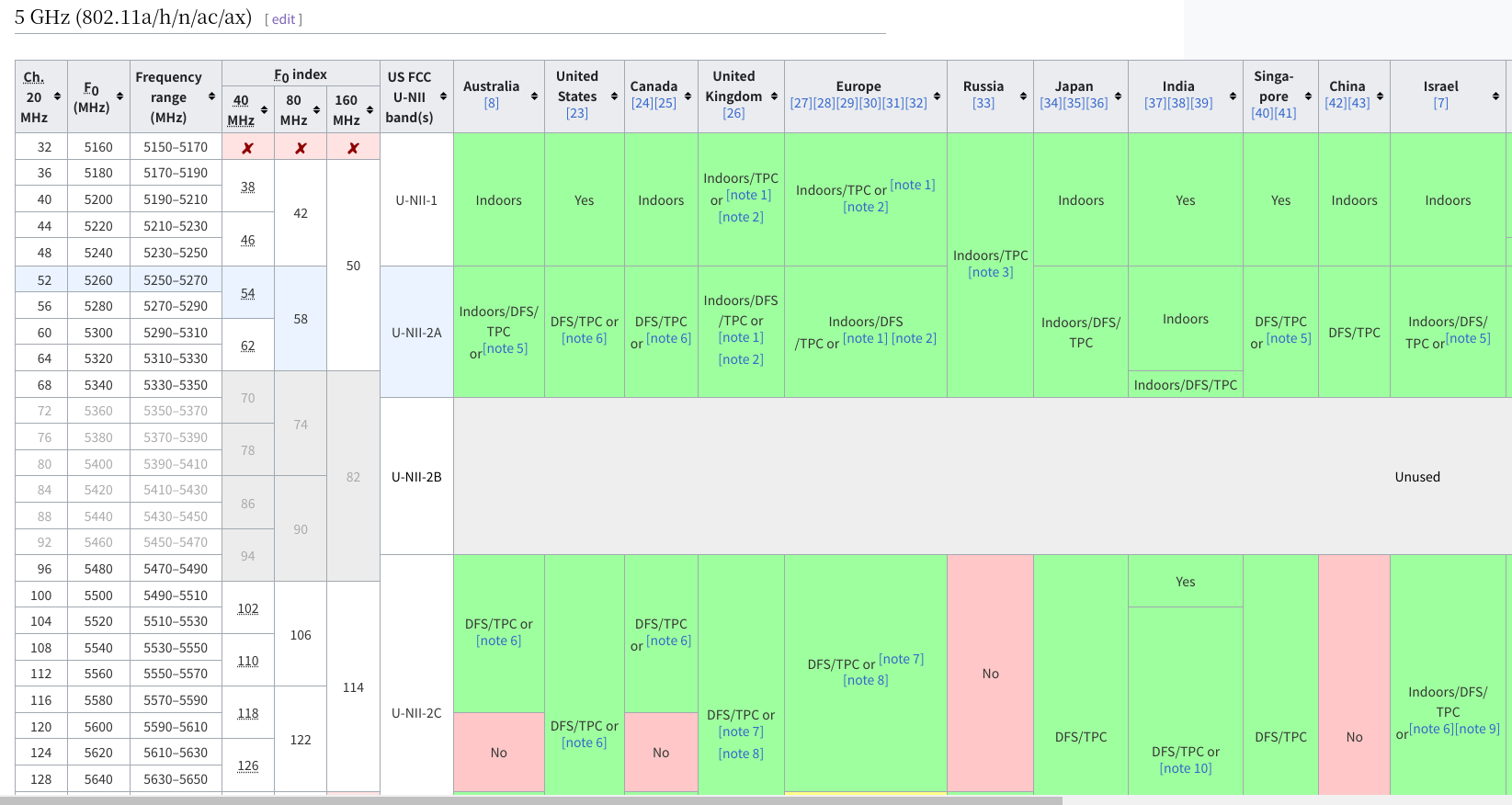
## 5 GHz (802.11a/h/n/ac/ax)
> **[List of WLAN channels](https://en.wikipedia.org/wiki/List_of_WLAN_channels#5_GHz_(802.11a/h/n/ac/ax))**
>
> Wireless LAN (WLAN) channels are frequently accessed using IEEE 802.11 protocols. The 802.11 standard provides several radio frequency bands for use in Wi-Fi communications, each divided into a multitude of frequency channels numbered at 5 MHz spacing (except in the 45/60 GHz band, where they are 0.54/1.08/2.16 GHz apart) between the centre frequency of the channel. The standards allow for channels to be bonded together into wider channels for faster throughput.
> 802.11ah operates in sub-gigahe...