# Kubernetes

**URL:** https://forum.ficusonline.com/t/topic/458
**Category:** Server
**Created:** [2022 年 9 月 19 日午前 2:18 UTC](https://forum.ficusonline.com/t/topic/458 "2022-09-19T02:18:16Z")
**Posts on this page:** 5
**Page:** 1

<div class="post-metadata">

### Author: ![tk-fuse](https://forum.ficusonline.com/user_avatar/forum.ficusonline.com/tk-fuse/32/255_2.png) [@tk-fuse](https://forum.ficusonline.com/u/tk-fuse)
#### Post date: [2022 年 9 月 19 日午前 2:18 UTC](https://forum.ficusonline.com/t/topic/458/1 "2022-09-19T02:18:16Z")

</div>

## kubernetesとdocker, containerdとの違い

コンテナについて3つのキーワード **`containerd, docker, kubernetes`** がややこしいのでここで簡単に整理します。

実際に試験的に運用することで理解度は向上し、勘違いに気付きます。

ランタイムである **`containerd`** の役割は、指定されたコンテナイメージからコンテナを稼働することであり、ポート指定や自動起動などの条件設定は出来ません。

**`Docker (Swarm)`** や **`Kubernetes`** は、複数の物理的なマシンを相互に結びつけ、それらを一つの巨大なシステム（クラスター）として効率的に運用することを目的としています。

**`Docker (Swarm)`** や **`Kubernetes`** では、 **`containerd`** では定義できない、より細かい条件を付与することにより、複数のコンテナから構成される最小のシステム（ポッド）が、より大きなシステムであるワーカーノードに効率的に配備されます。

物理的にワーカーノードを複数用意することで、万が一ポッドを配備したワーカーノードに不具合が発生した場合でも即座に他のワーカーノードにポッドが配備されるため、システム全体としては常時安定稼働している状態を維持できます。

**クラスター**  
複数の物理的なマシン（管理用のマスターノードとタスクを実行するワーカーノード）から構成されている大きなシステムです。クライアントからのアクセスが集中するイーコマースサイト、SNSサイトや配信サイト等に導入するメリットがあるでしょう。個人的にSIPシステムやオンライン会議システムで導入予定です。

**ノード**  
管理用のノード `(Control Plane)` とワーカーノード。ワーカーノードには様々なポッドが配備されます。

**ポッド**  
コンテナによるアプリから構成されます。

> **[Comparing Container Runtimes: containerd vs. Docker](https://earthly.dev/blog/containerd-vs-docker/)**
>
> Learn about the differences between container runtimes containerd and Docker in this informative article. Discover their features, how they work to...

> **[How to Work with Container Images Using ctr | iximiuz Labs](https://labs.iximiuz.com/courses/containerd-cli/ctr/image-management)**
>
> Pulling, pushing, importing, and inspecting container images with ctr.

 ![containerd_docker](https://forum.ficusonline.com/uploads/default/original/2X/7/7e1bb6b8ccbc041d1dd980c1707056304de46f89.png)

`containerd` のクライアントである `ctr` は、`docker` インストール時に既にインストールされています。単一のコンテナを稼働するだけであれば、`ctr` によるコマンドだけでもコンテナの稼働は可能です。

**`nginx`コンテナの稼働（`http://localhost`でアクセス）**

```auto
$ sudo ctr image pull docker.io/library/nginx:latest
$ sudo ctr run --net-host docker.io/library/nginx:latest nginx
.....
.....
ctl + c で終了

$ sudo ctr c list
CONTAINER IMAGE RUNTIME                  
nginx docker.io/library/nginx:latest io.containerd.runc.v2

```

`namespace` リスト

```auto
$ sudo ctr ns ls
NAME LABELS 
default        
moby           

```

`namespace` を指定してコンテナをリストアップ

```auto
$ sudo ctr -n moby c ls
CONTAINER IMAGE RUNTIME                  
9f2381fa65ea9cf4b445466182a0b71cd088d30e01fcad25dcb062f0d6f59aef - io.containerd.runc.v2  

```

イメージのリストアップ

```auto
$ sudo ctr i ls
REF TYPE DIGEST SIZE PLATFORMS LABELS 
docker.io/library/nginx:latest application/vnd.docker.distribution.manifest.list.v2+json sha256:0b970013351304af46f322da1263516b188318682b2ab1091862497591189ff1 54.1 MiB linux/386,linux/amd64,linux/arm/v5,linux/arm/v7,linux/arm64/v8,linux/mips64le,linux/ppc64le,linux/s390x -      

```

* * *

ヘルプ

```auto
$ ctr --help
NAME:
   ctr - 
        __
  _____/ /______
 / ___/__ / ___/
/ /__/ /_/ /
\ ___/\__ /_/

containerd CLI

USAGE:
   ctr [global options] command [command options] [arguments...]

VERSION:
   1.6.8

DESCRIPTION:
   
ctr is an unsupported debug and administrative client for interacting
with the containerd daemon. Because it is unsupported, the commands,
options, and operations are not guaranteed to be backward compatible or
stable from release to release of the containerd project.

COMMANDS:
   plugins, plugin provides information about containerd plugins
   version print the client and server versions
   containers, c, container manage containers
   content manage content
   events, event display containerd events
   images, image, i manage images
   leases manage leases
   namespaces, namespace, ns manage namespaces
   pprof provide golang pprof outputs for containerd
   run run a container
   snapshots, snapshot manage snapshots
   tasks, t, task manage tasks
   install install a new package
   oci OCI tools
   shim interact with a shim directly
   help, h Shows a list of commands or help for one command

GLOBAL OPTIONS:
   --debug enable debug output in logs
   --address value, -a value address for containerd's GRPC server (default: "/run/containerd/containerd.sock") [$CONTAINERD_ADDRESS]
   --timeout value total timeout for ctr commands (default: 0s)
   --connect-timeout value timeout for connecting to containerd (default: 0s)
   --namespace value, -n value namespace to use with commands (default: "default") [$CONTAINERD_NAMESPACE]
   --help, -h show help
   --version, -v print the version

```

* * *

### `"docker run", "ctr run"` コマンドオプションからの機能比較

**`docker run`**

```auto
$ docker run --help

Usage: docker run [OPTIONS] IMAGE [COMMAND] [ARG...]

Run a command in a new container

Options:
      --add-host list Add a custom host-to-IP mapping (host:ip)
  -a, --attach list Attach to STDIN, STDOUT or STDERR
      --blkio-weight uint16 Block IO (relative weight), between 10 and 1000, or 0 to disable (default 0)
      --blkio-weight-device list Block IO weight (relative device weight) (default [])
      --cap-add list Add Linux capabilities
      --cap-drop list Drop Linux capabilities
      --cgroup-parent string Optional parent cgroup for the container
      --cgroupns string Cgroup namespace to use (host|private)
                                       'host': Run the container in the Docker host's cgroup namespace
                                       'private': Run the container in its own private cgroup namespace
                                       '': Use the cgroup namespace as configured by the
                                                  default-cgroupns-mode option on the daemon (default)
      --cidfile string Write the container ID to the file
      --cpu-period int Limit CPU CFS (Completely Fair Scheduler) period
      --cpu-quota int Limit CPU CFS (Completely Fair Scheduler) quota
      --cpu-rt-period int Limit CPU real-time period in microseconds
      --cpu-rt-runtime int Limit CPU real-time runtime in microseconds
  -c, --cpu-shares int CPU shares (relative weight)
      --cpus decimal Number of CPUs
      --cpuset-cpus string CPUs in which to allow execution (0-3, 0,1)
      --cpuset-mems string MEMs in which to allow execution (0-3, 0,1)
  -d, --detach Run container in background and print container ID
      --detach-keys string Override the key sequence for detaching a container
      --device list Add a host device to the container
      --device-cgroup-rule list Add a rule to the cgroup allowed devices list
      --device-read-bps list Limit read rate (bytes per second) from a device (default [])
      --device-read-iops list Limit read rate (IO per second) from a device (default [])
      --device-write-bps list Limit write rate (bytes per second) to a device (default [])
      --device-write-iops list Limit write rate (IO per second) to a device (default [])
      --disable-content-trust Skip image verification (default true)
      --dns list Set custom DNS servers
      --dns-option list Set DNS options
      --dns-search list Set custom DNS search domains
      --domainname string Container NIS domain name
      --entrypoint string Overwrite the default ENTRYPOINT of the image
  -e, --env list Set environment variables
      --env-file list Read in a file of environment variables
      --expose list Expose a port or a range of ports
      --gpus gpu-request GPU devices to add to the container ('all' to pass all GPUs)
      --group-add list Add additional groups to join
      --health-cmd string Command to run to check health
      --health-interval duration Time between running the check (ms|s|m|h) (default 0s)
      --health-retries int Consecutive failures needed to report unhealthy
      --health-start-period duration Start period for the container to initialize before starting health-retries
                                       countdown (ms|s|m|h) (default 0s)
      --health-timeout duration Maximum time to allow one check to run (ms|s|m|h) (default 0s)
      --help Print usage
  -h, --hostname string Container host name
      --init Run an init inside the container that forwards signals and reaps processes
  -i, --interactive Keep STDIN open even if not attached
      --ip string IPv4 address (e.g., 172.30.100.104)
      --ip6 string IPv6 address (e.g., 2001:db8::33)
      --ipc string IPC mode to use
      --isolation string Container isolation technology
      --kernel-memory bytes Kernel memory limit
  -l, --label list Set meta data on a container
      --label-file list Read in a line delimited file of labels
      --link list Add link to another container
      --link-local-ip list Container IPv4/IPv6 link-local addresses
      --log-driver string Logging driver for the container
      --log-opt list Log driver options
      --mac-address string Container MAC address (e.g., 92:d0:c6:0a:29:33)
  -m, --memory bytes Memory limit
      --memory-reservation bytes Memory soft limit
      --memory-swap bytes Swap limit equal to memory plus swap: '-1' to enable unlimited swap
      --memory-swappiness int Tune container memory swappiness (0 to 100) (default -1)
      --mount mount Attach a filesystem mount to the container
      --name string Assign a name to the container
      --network network Connect a container to a network
      --network-alias list Add network-scoped alias for the container
      --no-healthcheck Disable any container-specified HEALTHCHECK
      --oom-kill-disable Disable OOM Killer
      --oom-score-adj int Tune host's OOM preferences (-1000 to 1000)
      --pid string PID namespace to use
      --pids-limit int Tune container pids limit (set -1 for unlimited)
      --platform string Set platform if server is multi-platform capable
      --privileged Give extended privileges to this container
  -p, --publish list Publish a container's port(s) to the host
  -P, --publish-all Publish all exposed ports to random ports
      --pull string Pull image before running ("always"|"missing"|"never") (default "missing")
      --read-only Mount the container's root filesystem as read only
      --restart string Restart policy to apply when a container exits (default "no")
      --rm Automatically remove the container when it exits
      --runtime string Runtime to use for this container
      --security-opt list Security Options
      --shm-size bytes Size of /dev/shm
      --sig-proxy Proxy received signals to the process (default true)
      --stop-signal string Signal to stop a container (default "SIGTERM")
      --stop-timeout int Timeout (in seconds) to stop a container
      --storage-opt list Storage driver options for the container
      --sysctl map Sysctl options (default map[])
      --tmpfs list Mount a tmpfs directory
  -t, --tty Allocate a pseudo-TTY
      --ulimit ulimit Ulimit options (default [])
  -u, --user string Username or UID (format: <name|uid>[:<group|gid>])
      --userns string User namespace to use
      --uts string UTS namespace to use
  -v, --volume list Bind mount a volume
      --volume-driver string Optional volume driver for the container
      --volumes-from list Mount volumes from the specified container(s)
  -w, --workdir string Working directory inside the container

```

**`ctr run`**

```auto
$ ctr run --help
NAME:
   ctr run - run a container

USAGE:
   ctr run [command options] [flags] Image|RootFS ID [COMMAND] [ARG...]

OPTIONS:
   --rm remove the container after running
   --null-io send all IO to /dev/null
   --log-uri value log uri
   --detach, -d detach from the task after it has started execution
   --fifo-dir value directory used for storing IO FIFOs
   --cgroup value cgroup path (To disable use of cgroup, set to "" explicitly)
   --platform value run image for specific platform
   --cni enable cni networking for the container
   --runc-binary value specify runc-compatible binary
   --runc-root value specify runc-compatible root
   --runc-systemd-cgroup start runc with systemd cgroup manager
   --uidmap container-uid:host-uid:length run inside a user namespace with the specified UID mapping range; specified with the format container-uid:host-uid:length
   --gidmap container-gid:host-gid:length run inside a user namespace with the specified GID mapping range; specified with the format container-gid:host-gid:length
   --remap-labels provide the user namespace ID remapping to the snapshotter via label options; requires snapshotter support
   --cpus value set the CFS cpu quota (default: 0)
   --cpu-shares value set the cpu shares (default: 1024)
   --snapshotter value snapshotter name. Empty value stands for the default value. [$CONTAINERD_SNAPSHOTTER]
   --snapshotter-label value labels added to the new snapshot for this container.
   --config value, -c value path to the runtime-specific spec config file
   --cwd value specify the working directory of the process
   --env value specify additional container environment variables (e.g. FOO=bar)
   --env-file value specify additional container environment variables in a file(e.g. FOO=bar, one per line)
   --label value specify additional labels (e.g. foo=bar)
   --mount value specify additional container mount (e.g. type=bind,src=/tmp,dst=/host,options=rbind:ro)
   --net-host enable host networking for the container
   --privileged run privileged container
   --read-only set the containers filesystem as readonly
   --runtime value runtime name (default: "io.containerd.runc.v2")
   --runtime-config-path value optional runtime config path
   --tty, -t allocate a TTY for the container
   --with-ns value specify existing Linux namespaces to join at container runtime (format '<nstype>:<path>')
   --pid-file value file path to write the task's pid
   --gpus value add gpus to the container
   --allow-new-privs turn off OCI spec's NoNewPrivileges feature flag
   --memory-limit value memory limit (in bytes) for the container (default: 0)
   --device value file path to a device to add to the container; or a path to a directory tree of devices to add to the container
   --cap-add value add Linux capabilities (Set capabilities with 'CAP_' prefix)
   --cap-drop value drop Linux capabilities (Set capabilities with 'CAP_' prefix)
   --seccomp enable the default seccomp profile
   --seccomp-profile value file path to custom seccomp profile. seccomp must be set to true, before using seccomp-profile
   --apparmor-default-profile value enable AppArmor with the default profile with the specified name, e.g. "cri-containerd.apparmor.d"
   --apparmor-profile value enable AppArmor with an existing custom profile
   --rdt-class value name of the RDT class to associate the container with. Specifies a Class of Service (CLOS) for cache and memory bandwidth management.
   --rootfs use custom rootfs that is not managed by containerd snapshotter
   --no-pivot disable use of pivot-root (linux only)
   --cpu-quota value Limit CPU CFS quota (default: -1)
   --cpu-period value Limit CPU CFS period (default: 0)
   --rootfs-propagation value set the propagation of the container rootfs

```

---

<div class="post-metadata">

### Author: ![tk-fuse](https://forum.ficusonline.com/user_avatar/forum.ficusonline.com/tk-fuse/32/255_2.png) [@tk-fuse](https://forum.ficusonline.com/u/tk-fuse)
#### Post date: [2025 年 6 月 11 日午前 12:06 UTC](https://forum.ficusonline.com/t/topic/458/2 "2025-06-11T00:06:08Z")

</div>

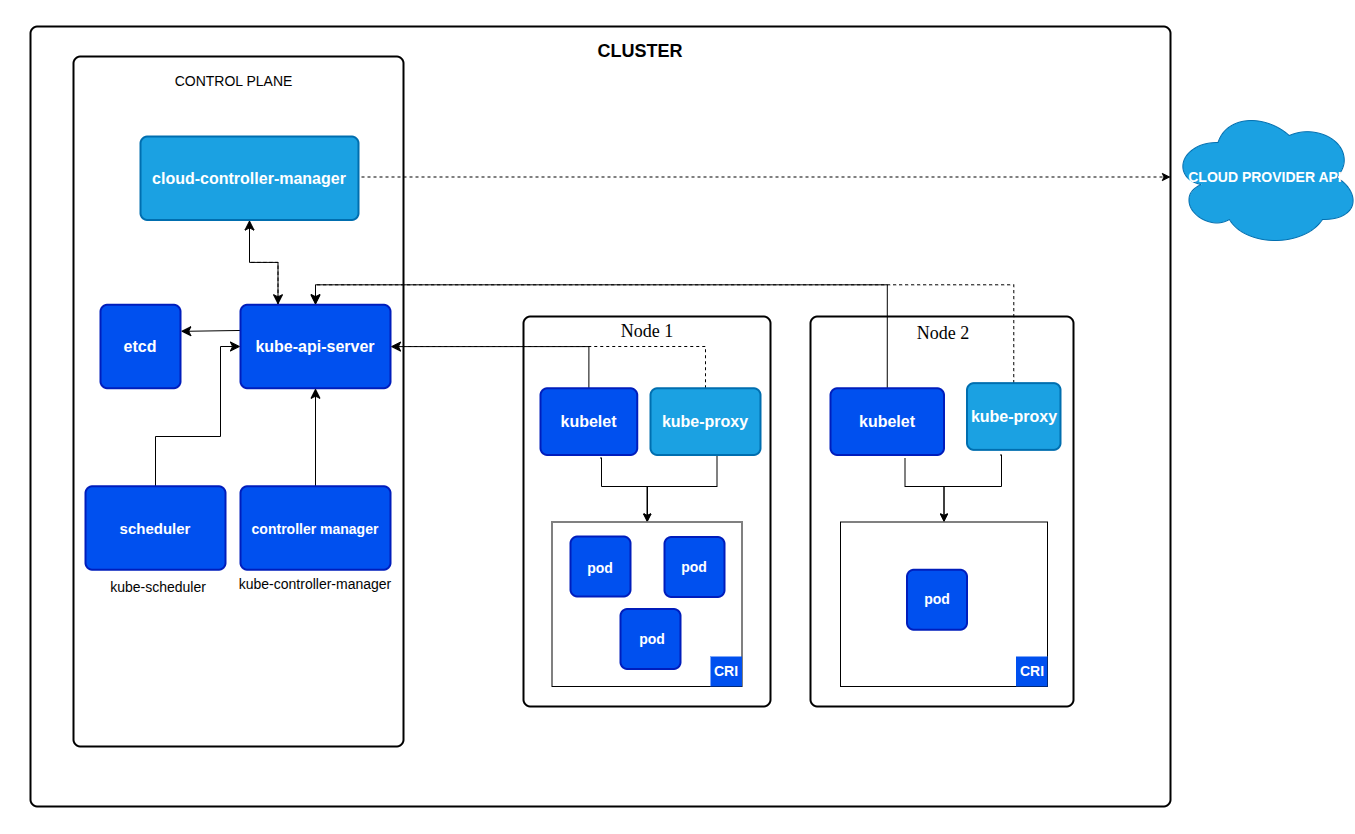
Kubernetesとは、上述のとおり **クラスター型のコンテナオーケストレーションシステム** であり、そのクラスターは **管理用ノード（Control Plane）** と、アプリケーション（Pod：コンテナ）が実行される **ワーカーノード（Node 1、Node 2 など）** で構成されます。

 ![Screenshot from 2025-06-11 09-07-20](https://forum.ficusonline.com/uploads/default/original/2X/4/41431cd06700d04af41d7c3c4fce3f394ee93e37.png)

通常、各ノードはそれぞれ **異なる物理マシンまたは仮想マシン上に配置** されます。上記の構成であれば、最低でも3台のホストマシン（1台のControl Plane、2台のWorker Node）が必要になります。

ただし、Kubernetesには用途に応じて使い分けられる軽量な実装や派生モデルが複数存在し、 **k3s、Minikube、MicroK8s** などを用いれば、 **1台のホスト上に単一ノードまたは複数コンポーネントを統合した形でクラスターを構築** することも可能です。

---

<div class="post-metadata">

### Author: ![tk-fuse](https://forum.ficusonline.com/user_avatar/forum.ficusonline.com/tk-fuse/32/255_2.png) [@tk-fuse](https://forum.ficusonline.com/u/tk-fuse)
#### Post date: [2025 年 6 月 11 日午前 12:39 UTC](https://forum.ficusonline.com/t/topic/458/3 "2025-06-11T00:39:01Z")

</div>

PVCのマニフェストを作成する際、storageClassNameを定義しないと自動的にデフォルトのstorageClassNameでPVが **動的プロビジョニング** で作成されます。このためPVでhostPathを指定している場合、その中身が空になります（PodのmountPathの中身が空になります）。

PVでhostPathの内容もPodにマウントしたい場合（ **静的プロビジョニング** を適用する場合）、storageClassNameを” ”とするか、存在しない任意の名称を指定する必要があります。

> **[Kubernetes Volume Provisioning: Dynamic VS Static - GeeksforGeeks](https://www.geeksforgeeks.org/devops/kubernetes-volume-provisioning-dynamic-vs-static/)**
>
> Your All-in-One Learning Portal: GeeksforGeeks is a comprehensive educational platform that empowers learners across domains-spanning computer science and programming, school education, upskilling, commerce, software tools, competitive exams, and...

## 動的プロビジョニング（Dynamic Provisioning）

### ➤ 概要

PVC が作成されたときに、 **Kubernetes が自動的に PV（永続ボリューム）を作成** 。

### ➤ 条件

- PVC に `storageClassName` を指定する（または省略してデフォルトの StorageClass を使用）。
- 該当の `StorageClass` に定義されたプロビジョナー（例：`kubernetes.io/aws-ebs`, `csi.storage.k8s.io/...`）を通じて、実際のボリューム（EBS, GCE PD, NFS など）がバックエンドで作成される。

### ➤ メリット

- 管理者が PV を手動で作成する必要がない。
- スケーラブルで DevOps や CI/CD に向いている。
- 各 Pod に個別のストレージを簡単に割り当てられる。

* * *

## 静的プロビジョニング（Static Provisioning）

### ➤ 概要

**クラスター管理者があらかじめ PV を作成** しておき、PVC がそれにマッチすればバインドされる。

### ➤ 条件

- PVC に `storageClassName: ""` を指定、または存在しないクラス名を使う。
- PVC の `accessModes`, `resources.requests.storage`, `selector` などが PV にマッチする必要がある。

### ➤ メリット

- 既存のストレージ（例: 既設の NFS サーバー）を使いたいときに有効。
- より厳密な制御が可能（ラベルや容量を明示的にマッチさせられる）。

---

<div class="post-metadata">

### Author: ![tk-fuse](https://forum.ficusonline.com/user_avatar/forum.ficusonline.com/tk-fuse/32/255_2.png) [@tk-fuse](https://forum.ficusonline.com/u/tk-fuse)
#### Post date: [2025 年 6 月 12 日午後 1:18 UTC](https://forum.ficusonline.com/t/topic/458/4 "2025-06-12T13:18:34Z")

</div>

## DNS

hostNetwork: true を使用している Pod（例: flexisip）から通常の Pod（例: mariadb）へアクセス

- **接続先の形式** :  
`<service-name>.<namespace>.svc.cluster.local`

#### `flexisip` 側に `dnsPolicy: ClusterFirstWithHostNet` を設定

> **[Pod's DNS Policy - DNS for Services and Pods](https://kubernetes.io/docs/concepts/services-networking/dns-pod-service/#pod-s-dns-policy)**
>
> Kubernetes creates DNS records for Services and Pods. You can contact Services with consistent DNS names instead of IP addresses. | Your workload can discover Services within your cluster using DNS; this page explains how that works.

> "`ClusterFirstWithHostNet` ": For Pods running with hostNetwork, you should explicitly set its DNS policy to "`ClusterFirstWithHostNet` ". Otherwise, Pods running with hostNetwork and `"ClusterFirst"` will fallback to the behavior of the `"Default"` policy.

```auto
spec:
  hostNetwork: true
  dnsPolicy: ClusterFirstWithHostNet

```

* * *

## [Ports and Protocols | Kubernetes](https://kubernetes.io/docs/reference/networking/ports-and-protocols/)

### Control plane

| Protocol | Direction | Port Range | Purpose | Used By |
| --- | --- | --- | --- | --- |
| TCP | Inbound | 6443 | Kubernetes API server | All |
| TCP | Inbound | 2379-2380 | etcd server client API | kube-apiserver, etcd |
| TCP | Inbound | 10250 | Kubelet API | Self, Control plane |
| TCP | Inbound | 10259 | kube-scheduler | Self |
| TCP | Inbound | 10257 | kube-controller-manager | Self |

### Worker node(s)

| Protocol | Direction | Port Range | Purpose | Used By |
| --- | --- | --- | --- | --- |
| TCP | Inbound | 10250 | Kubelet API | Self, Control plane |
| TCP | Inbound | 10256 | kube-proxy | Self, Load balancers |
| TCP | Inbound | 30000-32767 | NodePort Services† | All |
| UDP | Inbound | 30000-32767 | NodePort Services† | All |

## IPv4/IPv6

> **[IPv4/IPv6 dual-stack](https://kubernetes.io/docs/concepts/services-networking/dual-stack/)**
>
> Kubernetes lets you configure single-stack IPv4 networking, single-stack IPv6 networking, or dual stack networking with both network families active. This page explains how.

---

<div class="post-metadata">

### Author: ![tk-fuse](https://forum.ficusonline.com/user_avatar/forum.ficusonline.com/tk-fuse/32/255_2.png) [@tk-fuse](https://forum.ficusonline.com/u/tk-fuse)
#### Post date: [2025 年 6 月 19 日午前 3:54 UTC](https://forum.ficusonline.com/t/topic/458/5 "2025-06-19T03:54:49Z")

</div>

> **[GitHub - projectcalico/calico: Cloud native networking and network security](https://github.com/projectcalico/calico)**
>
> Cloud native networking and network security

> **[Installing on on-premises deployments | Calico Documentation](https://docs.tigera.io/calico/latest/getting-started/kubernetes/self-managed-onprem/onpremises)**
>
> Install Calico networking and network policy for on-premises deployments.

```auto
$ curl https://raw.githubusercontent.com/projectcalico/calico/v3.30.1/manifests/calico.yaml -O
$ kubectl apply -f calico.yaml

```