# Arduinoハードウェア
**URL:** https://forum.ficusonline.com/t/topic/476
**Category:** Firmware
**Created:** [2023 年 1 月 16 日午前 11:46 UTC](https://forum.ficusonline.com/t/topic/476 "2023-01-16T11:46:36Z")
**Posts on this page:** 4
**Page:** 1
### Author:  [@tk-fuse](https://forum.ficusonline.com/u/tk-fuse)
#### Post date: [2023 年 1 月 16 日午前 11:46 UTC](https://forum.ficusonline.com/t/topic/476/1 "2023-01-16T11:46:36Z")
## Arduino Nano ピン配置
ハードウェアの基本動作確認用にArduino Nano使用
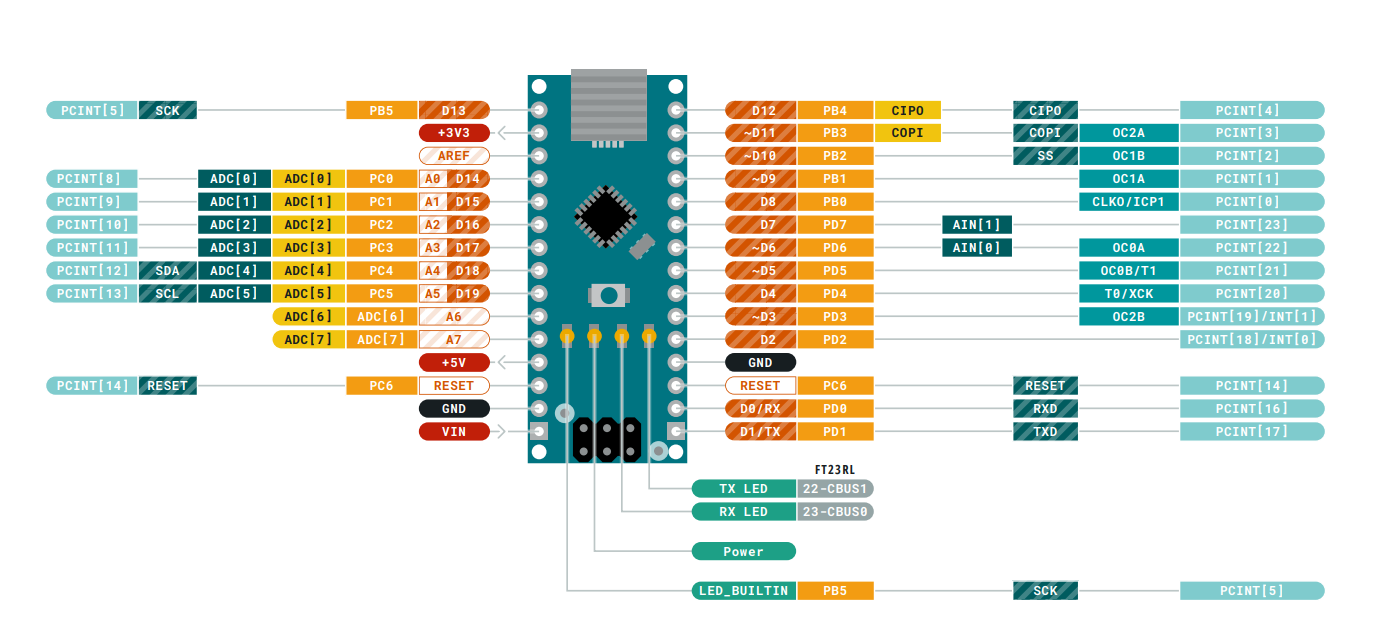

> **[Pinout-NANO\_latest.pdf](https://content.arduino.cc/assets/Pinout-NANO_latest.pdf)**
**中華版Arduino Nano**
> **[Chinese nano](https://forum.arduino.cc/t/chinese-nano/635502)**
>
> Hi! my friend has this chinese arduino nano that wont work and i have tried everything to help him but can't still get what's wrong. ive tried to read on a lot of forum, and did a lot of research, and i have come forward to think that it is the...
---
### Author:  [@tk-fuse](https://forum.ficusonline.com/u/tk-fuse)
#### Post date: [2023 年 1 月 18 日午前 2:21 UTC](https://forum.ficusonline.com/t/topic/476/2 "2023-01-18T02:21:23Z")
## ArduinoボードとUSB接続する際のバグ(通信不可:Ubuntu 22.04)
>
原因は以下のbrlttyデーモン
### brltty daemon prevents creation of ttyUSB0 device link
> **[Comment #49 : Bug #874181 : Bugs : brltty package : Ubuntu](https://bugs.launchpad.net/ubuntu/+source/brltty/+bug/874181/comments/49)**
>
> I just run into this issue after upgrading from 20.04. This is breaking a lot of things for me. It seems that "apt remove brltty" resolved the issue for now, but it should work out of the box as it used to.
**BRLTTY**
> **[BRLTTY - Official Home](https://brltty.app/)**
BRLTTYは点字に関わるバックグラウンドデーモンのため必要なければ削除して対応。
```auto
$ sudo apt remove btltty
```
---
### Author:  [@tk-fuse](https://forum.ficusonline.com/u/tk-fuse)
#### Post date: [2023 年 1 月 18 日午前 6:14 UTC](https://forum.ficusonline.com/t/topic/476/3 "2023-01-18T06:14:11Z")
### ‘Error: avrdude’ when uploading(Arduino Nano, Ubuntu 22.04, Arduino IDE 2.0.3)
[https://support.arduino.cc/hc/en-us/articles/4401874331410#avrdude-stk500\_recv-and-stk500\_getsync](https://support.arduino.cc/hc/en-us/articles/4401874331410#avrdude-stk500_recv-and-stk500_getsync)
アップロード時のエラーメッセージ
**注)** Tx,Rx端子が他のデバイスに接続されてる場合にも表示されます。
```auto
avrdude: stk500_recv(): programmer is not responding
avrdude: stk500_getsync() attempt 1 of 10: not in sync: resp=0x00
avrdude: stk500_recv(): programmer is not responding
avrdude: stk500_getsync() attempt 2 of 10: not in sync: resp=0x00
...
```
下記のループバックテストは廉価版の **CH340 USB to serial chip** が実装されている場合は無効。
[https://support.arduino.cc/hc/en-us/articles/360020366520-How-to-do-a-loopback-test](https://support.arduino.cc/hc/en-us/articles/360020366520-How-to-do-a-loopback-test)
**ブートローダをArduino UNO経由でArduino Nanoに書き込む作業が必要。**
[https://support.arduino.cc/hc/en-us/articles/4841602539164-Burn-the-bootloader-on-UNO-Mega-and-classic-Nano-using-another-Arduino](https://support.arduino.cc/hc/en-us/articles/4841602539164-Burn-the-bootloader-on-UNO-Mega-and-classic-Nano-using-another-Arduino)
接続図

上記Arduino UNOをUSBでPCに接続して以下のプロセスを実行(書き込みのプロセスが表示されるよう _Preference \> Show verbose output during_ にはチェックを入れた方が良いでしょう)。
**ボードの選択**
_Tools \> Board_, for example _Tools \> Board \> Arduino AVR Boards \> Arduino Uno_.
**ポートの選択**
_Tools \> Port_
**ブートローダ用スケッチの読み込み**
_File \> Examples \> 11.ArduinoISP \> ArduinoISP_
**スケッチのアップロード**
これでArduino UNOがブートローダのプログラマーになるので、この状態で書き込み先のArduino Nanoを _Tools \> Board_から選択します。
**プログラマーを指定**
_Tools \> Programmer \> Arduino as ISP_
**書き込み**
_Tools \> Burn Bootloader_
終了すると以下のメッセージが表示されます。
```auto
......
......
avrdude done. Thank you.
```
---
### Author:  [@tk-fuse](https://forum.ficusonline.com/u/tk-fuse)
#### Post date: [2023 年 1 月 24 日午前 2:29 UTC](https://forum.ficusonline.com/t/topic/476/4 "2023-01-24T02:29:41Z")
## Linux(Ubuntu)でPlatformIOを使用する場合
マイコンボードのUSB-Serialチップデバイスの登録が必要です。
[99-platformio-udev.rules — PlatformIO latest documentation](https://docs.platformio.org/en/latest/core/installation/udev-rules.html)
マイコンボードのUSB-Serialチップデバイスの **VID(Vender ID)** と **PID(Product ID)** は、VSCodeのPlatformIOのターミナル(新規ターミナル)から以下のコマンドで確認できます。
[pio device list — PlatformIO latest documentation](https://docs.platformio.org/en/latest/core/userguide/device/cmd_list.html#cmd-device-list)
```auto
$ pio device list
/dev/cu.SLAB_USBtoUART
----------
Hardware ID: USB VID:PID=10c4:ea60 SNR=0001
Description: CP2102 USB to UART Bridge Controller
/dev/cu.uart-1CFF4676258F4543
----------
Hardware ID: USB VID:PID=451:f432 SNR=1CFF4676258F4543
Description: Texas Instruments MSP-FET430UIF
```
デバイスルールのダウンロードとコピー
```auto
$ curl -fsSL https://raw.githubusercontent.com/platformio/platformio-core/develop/platformio/assets/system/99-platformio-udev.rules | sudo tee /etc/udev/rules.d/99-platformio-udev.rules
```
udev(userspace dev)サービスの再起動
```auto
$ sudo service udev restart
```
または現ユーザをデバイスの管理グループへ参加。
デバイスのグループ確認
```shell
$ ls -l /dev/ttyACM0
crw-rw-rw- 1 root dialout 166, 0 6月 28 07:25 /dev/ttyACM0
```
グループを確認後(上記の場合:dialout)、現ユーザをグループdialout, plugdevなどへ追加 **(再ログインが必要)**
```auto
$ sudo usermod -a -G dialout $USER
$ sudo usermod -a -G plugdev $USER
```
>
* * *
Arduino Nanoでプロジェクトを作成する場合のボードの選択は、新規にブートローダをアップロードしたため下記のデバイスとします。
[Arduino Nano ATmega328 (New Bootloader) — PlatformIO latest documentation](https://docs.platformio.org/en/latest/boards/atmelavr/nanoatmega328new.html)
**`platformio.ini`**
```auto
; PlatformIO Project Configuration File
;
; Build options: build flags, source filter
; Upload options: custom upload port, speed and extra flags
; Library options: dependencies, extra library storages
; Advanced options: extra scripting
;
; Please visit documentation for the other options and examples
; https://docs.platformio.org/page/projectconf.html
[env:nanoatmega328new]
platform = atmelavr
board = nanoatmega328new
framework = arduino
```