# Porkbunでドメイン取得、使用メモ
**URL:** https://forum.ficusonline.com/t/topic/488
**Category:** Server
**Created:** [2023 年 7 月 26 日午後 3:20 UTC](https://forum.ficusonline.com/t/topic/488 "2023-07-26T15:20:14Z")
**Posts on this page:** 5
**Page:** 1
### Author:  [@tk-fuse](https://forum.ficusonline.com/u/tk-fuse)
#### Post date: [2023 年 7 月 26 日午後 3:20 UTC](https://forum.ficusonline.com/t/topic/488/1 "2023-07-26T15:20:14Z")
## ドメイン取得:[ficusonline.com](http://ficusonline.com)
注)2024年Cloudflareの方が安くなりました。

ドメインの登録・更新費用が比較的安価で、世界中のユーザから使い勝手の良さやサポートで高い評価を得ている **`porkbun`** の使用メモ。`no-ip`提供の無料サブドメインからの乗換え(従来のURLからはリダイレクトされます)。
[.com](https://porkbun.com/tld/com) 登録時(1年有効):$9.73 更新費用:$9.73/年 移転費用:$9.73
以下のサービスが含まれます。
- dns
- email forwarding
- ssl
- whois privacy
- dejigamaflipper
> **[porkbun.com | An oddly satisfying experience.](https://porkbun.com/)**
>
> Porkbun is an amazingly awesome ICANN accredited domain name registrar based out of the Pacific Northwest. We're different, we're easy, and we're affordable. Use us, you won't be sorry. If you don't use us we'll be sad, but we'll still love you.
### How to verify your domain with Google Search Console
> **[How to verify your domain with Google Search Console - Porkbun Knowledge Base](https://kb.porkbun.com/article/166-how-to-verify-your-domain-with-google-search-console)**
>
> Looking to verify your domain with Google Search Console? You're in the right place! 1 To start, visit search.google.com/search-console/welcome while signed in
---
### Author:  [@tk-fuse](https://forum.ficusonline.com/u/tk-fuse)
#### Post date: [2023 年 7 月 28 日午後 12:50 UTC](https://forum.ficusonline.com/t/topic/488/2 "2023-07-28T12:50:48Z")
## DNS-01 チャレンジ(Certbot)
> **注)** Cloudflareのプロキシとネームサーバを利用することにしたため、PorkbunではなくCertbotのCloudflareのDNS-01チャレンジを選択。
> [@Cloudflare: プロキシ機能、サーバセキュリティ、Certbot DNS-01チャレンジ、WARP Client](https://forum.ficusonline.com/t/topic/494/4):
>
> DNS-01チャレンジ Welcome to certbot-dns-cloudflare’s documentation! CertbotをDockerコンテナとして起動し、DNS-01チャレンジによるドメインのTLS認証と証明書の取得を行います。CertbotのデフォルトDockerイメージには、CloudflareのDNS-01チャレンジのプラグインが含めれていないため、以下のイメージを…
CertbotによるTLS認証手続きで、ルートドメインを取得済であれば、http-01チャレンジ(HTTP認証)よりもdns-01チャレンジ(DNS認証)を利用した方が、サブドメイン毎に認証手続きをする手間などが省け便利です。
DNS認証の具体例については下記を参照して下さい。
> **[How To Acquire a Let's Encrypt Certificate Using DNS Validation with...](https://www.digitalocean.com/community/tutorials/how-to-acquire-a-let-s-encrypt-certificate-using-dns-validation-with-acme-dns-certbot-on-ubuntu-18-04)**
>
> DNS validation allows for certificate issuance requests to be verified using DNS records, rather than by serving content over HTTP. The acme-dns-certbot tool…
DNS認証には、プラグインを使用する方法とmanualオプションを利用する方法がありますが、manualの場合、TXTテキストを90日以内に更新する必要があるため更新コマンドは利用できません。
| Plugin | Auth | Inst | Notes | Challenge types (and port) |
| --- | --- | --- | --- | --- |
| [DNS plugins](https://eff-certbot.readthedocs.io/en/stable/using.html#dns-plugins) | Y | N | This category of plugins automates obtaining a certificate by modifying DNS records to prove you have control over a domain. Doing domain validation in this way is the only way to obtain wildcard certificates from Let’s Encrypt. | [dns-01](https://datatracker.ietf.org/doc/html/rfc8555#section-8.4) (53) |
| [manual](https://eff-certbot.readthedocs.io/en/stable/using.html#manual) | Y | N | Obtain a certificate by manually following instructions to perform domain validation yourself. Certificates created this way do not support autorenewal. Autorenewal may be enabled by providing an authentication hook script to automate the domain validation steps. | [http-01](https://datatracker.ietf.org/doc/html/rfc8555#section-8.3) (80) or [dns-01](https://datatracker.ietf.org/doc/html/rfc8555#section-8.4) (53) |
### [Third-party plugins](https://eff-certbot.readthedocs.io/en/stable/using.html#third-party-plugins)
ドメインを提供しているサードパーティ向けcertbotのプラグインは、オフィシャルまたは有志により提供されています。
There are also a number of third-party plugins for the client, provided by other developers. Many are beta/experimental, but some are already in widespread use:
| Plugin | Auth | Inst | Notes |
| --- | --- | --- | --- |
| [haproxy](https://github.com/greenhost/certbot-haproxy) | Y | Y | Integration with the HAProxy load balancer |
| [s3front](https://github.com/dlapiduz/letsencrypt-s3front) | Y | Y | Integration with Amazon CloudFront distribution of S3 buckets |
| [gandi](https://github.com/obynio/certbot-plugin-gandi) | Y | N | Obtain certificates via the Gandi LiveDNS API |
| [varnish](https://git.sesse.net/?p=letsencrypt-varnish-plugin) | Y | N | Obtain certificates via a Varnish server |
| [external-auth](https://github.com/EnigmaBridge/certbot-external-auth) | Y | Y | A plugin for convenient scripting |
| [pritunl](https://github.com/kharkevich/letsencrypt-pritunl) | N | Y | Install certificates in pritunl distributed OpenVPN servers |
| [proxmox](https://github.com/kharkevich/letsencrypt-proxmox) | N | Y | Install certificates in Proxmox Virtualization servers |
| [dns-standalone](https://github.com/siilike/certbot-dns-standalone) | Y | N | Obtain certificates via an integrated DNS server |
| [dns-ispconfig](https://github.com/m42e/certbot-dns-ispconfig) | Y | N | DNS Authentication using ISPConfig as DNS server |
| [dns-clouddns](https://github.com/vshosting/certbot-dns-clouddns) | Y | N | DNS Authentication using CloudDNS API |
| [dns-lightsail](https://github.com/noi/certbot-dns-lightsail) | Y | N | DNS Authentication using Amazon Lightsail DNS API |
| [dns-inwx](https://github.com/oGGy990/certbot-dns-inwx/) | Y | Y | DNS Authentication for INWX through the XML API |
| [dns-azure](https://github.com/binkhq/certbot-dns-azure) | Y | N | DNS Authentication using Azure DNS |
| [dns-godaddy](https://github.com/miigotu/certbot-dns-godaddy) | Y | N | DNS Authentication using Godaddy DNS |
| [dns-yandexcloud](https://github.com/PykupeJIbc/certbot-dns-yandexcloud) | Y | N | DNS Authentication using Yandex Cloud DNS |
| [dns-bunny](https://github.com/mwt/certbot-dns-bunny) | Y | N | DNS Authentication using BunnyDNS |
| [njalla](https://github.com/chaptergy/certbot-dns-njalla) | Y | N | DNS Authentication for njalla |
| [DuckDNS](https://github.com/infinityofspace/certbot_dns_duckdns) | Y | N | DNS Authentication for DuckDNS |
| [Porkbun](https://github.com/infinityofspace/certbot_dns_porkbun) | Y | N | DNS Authentication for Porkbun |
| [Infomaniak](https://github.com/Infomaniak/certbot-dns-infomaniak) | Y | N | DNS Authentication using Infomaniak Domains API |
| [dns-multi](https://github.com/alexzorin/certbot-dns-multi) | Y | N | DNS authentication of 100+ providers using go-acme/lego |
| [dns-dnsmanager](https://github.com/stayallive/certbot-dns-dnsmanager) | Y | N | DNS Authentication for [dnsmanager.io](http://dnsmanager.io) |
| [standalone-nfq](https://github.com/alexzorin/certbot-standalone-nfq) | Y | N | HTTP Authentication that works with any webserver (Linux only) |
If you’re interested, you can also [write your own plugin](https://eff-certbot.readthedocs.io/en/stable/contributing.html#dev-plugin).
* * *
### Porkbun Certbot DNS認証プラグイン
[https://github.com/infinityofspace/certbot\_dns\_porkbun](https://github.com/infinityofspace/certbot_dns_porkbun)
PorkbunからAPIキーを取得しporkbun.iniファイルを作成。(アクセス権は600)
`porkbun.ini`
```auto
dns_porkbun_key=
dns_porkbun_secret=
```
DockerによりPorkbun Certbotプラグイン実行
```auto
$ docker run -it --rm --name certbot_porkbun -v "$PWD/letsencrypt:/etc/letsencrypt" -v "/var/log/letsencrypt:/var/log/letsencrypt" -v "$PWD/porkbun.ini:/conf/porkbun.ini" infinityofspace/certbot_dns_porkbun:latest \
certonly \
--non-interactive \
--agree-tos \
--email \
--preferred-challenges dns \
--authenticator dns-porkbun \
--dns-porkbun-credentials /conf/porkbun.ini \
--dns-porkbun-propagation-seconds 60 \
-d "example.com" -d "*.example.com"
```
認証ドメインの確認
```auto
$ docker run -it --rm --name certbot_porkbun -v "$PWD/letsencrypt:/etc/letsencrypt" -v "/var/log/letsencrypt:/var/log/letsencrypt" -v "$PWD/porkbun.ini:/conf/porkbun.ini" infinityofspace/certbot_dns_porkbun:latest \
certificates
Saving debug log to /var/log/letsencrypt/letsencrypt.log
- - - - - - - - - - - - - - - - - - - - - - - - - - - - - - - - - - - - - - - -
Found the following certs:
Certificate Name: example.com
Serial Number: xxxxxxxxxxxxxxxxxxxxxxxxxxxxxxxxxx
Key Type: ECDSA
Domains: example.com *.example.com
Expiry Date: 2023-xx-xx 00:54:35+00:00 (VALID: 89 days)
Certificate Path: /etc/letsencrypt/live/example.com/fullchain.pem
Private Key Path: /etc/letsencrypt/live/example.com/privkey.pem
```
更新(クローンジョブに登録)
```auto
$ docker run -it --rm --name certbot_porkbun -v "$PWD/letsencrypt:/etc/letsencrypt" -v "/var/log/letsencrypt:/var/log/letsencrypt" -v "$PWD/porkbun.ini:/conf/porkbun.ini" infinityofspace/certbot_dns_porkbun:latest \
renew
Saving debug log to /var/log/letsencrypt/letsencrypt.log
- - - - - - - - - - - - - - - - - - - - - - - - - - - - - - - - - - - - - - - -
Processing /etc/letsencrypt/renewal/example.com.conf
- - - - - - - - - - - - - - - - - - - - - - - - - - - - - - - - - - - - - - - -
Certificate not yet due for renewal
- - - - - - - - - - - - - - - - - - - - - - - - - - - - - - - - - - - - - - - -
The following certificates are not due for renewal yet:
/etc/letsencrypt/live/example.com/fullchain.pem expires on 2023-xx-xx (skipped)
No renewals were attempted.
```
### Cerbot Command Line Options
[User Guide — Certbot 5.4.0 documentation](https://eff-certbot.readthedocs.io/en/stable/using.html#certbot-command-line-options)
---
### Author:  [@tk-fuse](https://forum.ficusonline.com/u/tk-fuse)
#### Post date: [2023 年 10 月 2 日午前 1:54 UTC](https://forum.ficusonline.com/t/topic/488/3 "2023-10-02T01:54:02Z")
## How to enable Porkbun’s Cloudflare DNSSEC
DNSSEC: DNSデータにデジタル的に署名し、中間者による DNS 攻撃を防ぐ方法。
[https://www.cloudflare.com/ja-jp/dns/dnssec/how-dnssec-works/](https://www.cloudflare.com/ja-jp/dns/dnssec/how-dnssec-works/)
**DNSSECの有効化**
Porkbun管理画面からトグルアイコン(DNSSEC cloudflare)をクリック
> **[How to enable Porkbun's Cloudflare DNSSEC - Porkbun Knowledge Base](https://kb.porkbun.com/article/216-how-to-enable-porkbuns-cloudflare-dnssec)**
>
> DNSSEC is a way to digitally "sign" your DNS data, preventing man-in-the-middle DNS attacks. Note This guide walks through how to enable DNSSEC on a domain usin
* * *
**DNSSEC: Cloudflare**
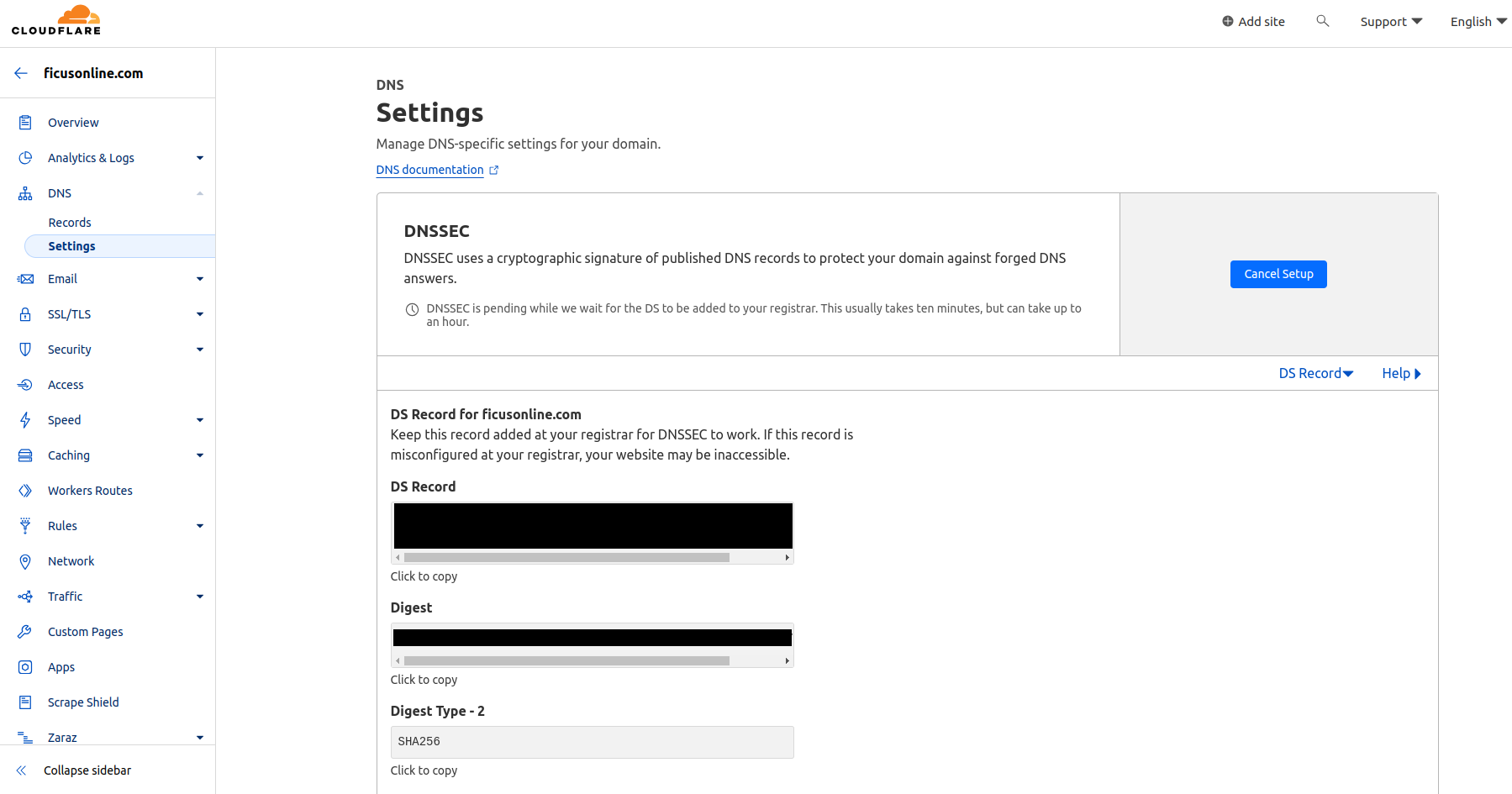
CloudflareにPorkbunで取得したドメインを登録、Cloudflare提供のネームサーバへ変更する場合、DNSSECは設定しない(無効とする)こと。
PorkbunでのDNSSECの設定は、Cloudflareでの設定が完了した後に行うこと。
Cloudflare側でDNSSECの設定画面から必要なパラメータを出力し、これらをPorkbunのDNSSECの該当箇所に入力して下さい。ただし **keyData** の入力は必要ありません。
> **[Enable DNSSEC - DNSSEC](https://developers.cloudflare.com/dns/dnssec/#enable-dnssec)**
>
> When you enable DNSSEC, Cloudflare signs your zone, publishes your public signing keys, and generates your DS record. | DNS Security Extensions (DNSSEC) adds an extra layer of authentication to DNS, ensuring requests are not routed to a spoofed...
---
### Author:  [@tk-fuse](https://forum.ficusonline.com/u/tk-fuse)
#### Post date: [2023 年 10 月 5 日午前 12:50 UTC](https://forum.ficusonline.com/t/topic/488/4 "2023-10-05T00:50:02Z")
旧ドメインから新ドメインへのリダイレクトはNginxの設定ファイルで行います。
下記記事を参照のこと。
> [@NGINX 設定ティップス](https://forum.ficusonline.com/t/topic/333/22):
>
> 旧ドメインから新ドメインへのリダイレクト 旧ドメインがSSL対応だった場合のリダイレクト設定(プロキシサーバー) 注) 旧ドメインのSSL認証は必要ありません。 /etc/nginx/conf.d/redirect\_to\_xxx.conf server { server\_name old.example.com; return 301 https://new.example.…
---
### Author:  [@tk-fuse](https://forum.ficusonline.com/u/tk-fuse)
#### Post date: [2023 年 11 月 6 日午後 2:46 UTC](https://forum.ficusonline.com/t/topic/488/5 "2023-11-06T14:46:46Z")
## DNS SRVレコードとは?
[https://www.cloudflare.com/ja-jp/learning/dns/dns-records/dns-srv-record/](https://www.cloudflare.com/ja-jp/learning/dns/dns-records/dns-srv-record/)
[DNS](https://www.cloudflare.com/learning/dns/what-is-dns/)「サービス」(SRV)のレコードは、[voice over IP(VoIP)](https://www.cloudflare.com/learning/video/what-is-voip/)、インスタントメッセージングなどに使用する特定のサービスのホストとポートを指定します。他のほとんどの [DNSレコード](https://www.cloudflare.com/learning/dns/dns-records/)には、サーバー名または[IPアドレス](https://www.cloudflare.com/learning/dns/glossary/what-is-my-ip-address/)のみを指定しますが、SRV レコードにはそのIP アドレスのポートも含めることができます。[インターネットプロトコル](https://www.cloudflare.com/learning/network-layer/internet-protocol/)の中には、機能するためにSRVレコードの使用を必要とするものがあります。
以上、Cloudflareによる説明です。SIPサーバを公開する場合には、このSRVサービスを利用し、ドメインとの紐付けを行いましょう。
## SRVのレコードの中身は?
SRVレコードには、以下の情報が含まれています。ここでは、各フィールドの値の例を示します。
| サービス | XMPP |
| --- | --- |
| proto\* | TCP |
| name\*\* | [example.com](http://example.com) |
| TTL | 86400 |
| class | IN |
| 種類 | SRV |
| 優先度 | 10 |
| weight | 5 |
| port | 5223 |
| ターゲット | [server.example.com](http://server.example.com) |
_\*「プロトコル」の略。トランスポートプロトコルのように使う
\*\*[ドメイン名](https://www.cloudflare.com/learning/dns/glossary/what-is-a-domain-name/)._
ただし、SRVレコードは実際には次のような形式になります。
```auto
_service._proto.name. TTL class type of record priority weight port target.
```
そのため、SRVレコードの例は、実際には次のようになります。
```auto
_xmpp._tcp.example.com. 86400 IN SRV 10 5 5223 server.example.com.
```
上記の例では、「\_xmpp」がサービスの種類(XMPPプロトコル)、「\_tcp」がトランスポートプロトコル [TCP](https://www.cloudflare.com/learning/ddos/glossary/tcp-ip/) を示し、「[example.com](http://example.com)」がホスト(ドメイン名)、「[Server.example.com](http://Server.example.com)」が対象サーバー、「5223」がそのサーバーで使用されているポートを示しています。
SRVレコードは、[Aレコード](https://www.cloudflare.com/learning/dns/dns-records/dns-a-record/)(IPv4の場合)または[AAAAレコード](https://www.cloudflare.com/learning/dns/dns-records/dns-aaaa-record/)(IPv6の場合)を指している必要があります。SRVレコードが列挙するサーバー名は、 [CNAME](https://www.cloudflare.com/learning/dns/dns-records/dns-cname-record/) にはできません。したがって、「[server.example.com](http://server.example.com)」は、そのドメイン名の A または AAAA レコードに直接つなげる形で指定する必要があります。
**Porkbun** でTLS接続するSIPサーバの場合の設定は以下の図ようになります。
> **[How to create an SRV record - Porkbun Knowledge Base](https://kb.porkbun.com/article/109-how-to-create-an-srv-record)**
>
> An SRV record provides information about web-based services and is most commonly used for SIP services and custom server configurations such as Minecraft server
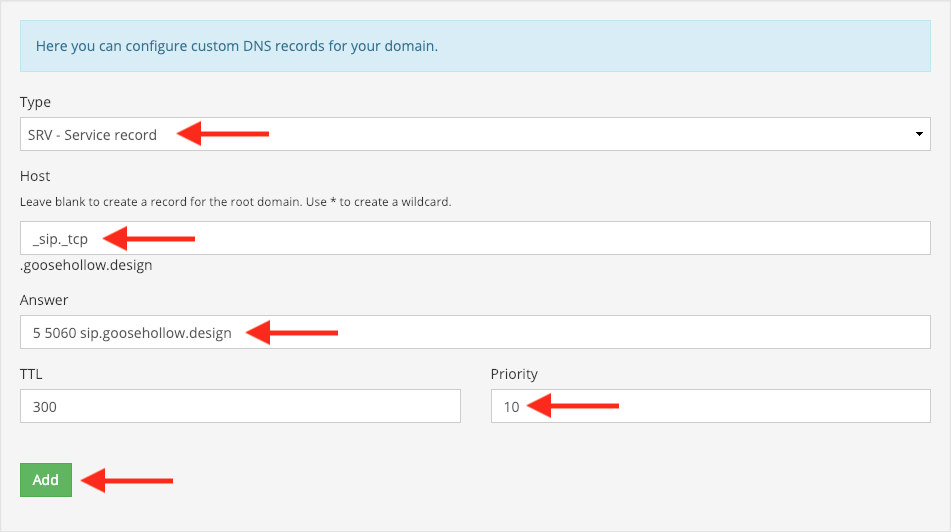
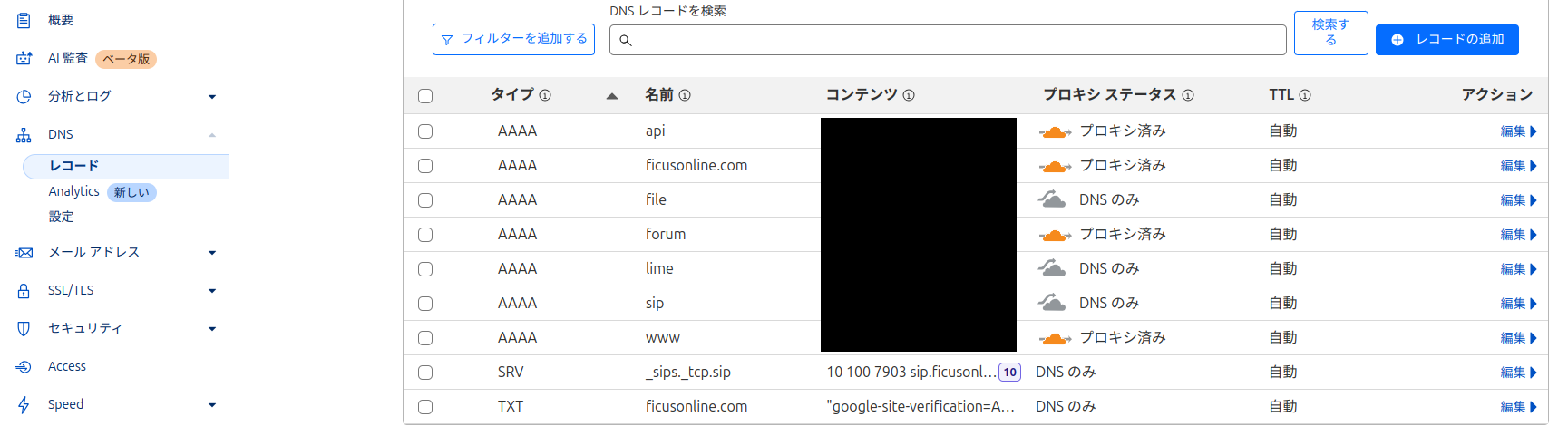
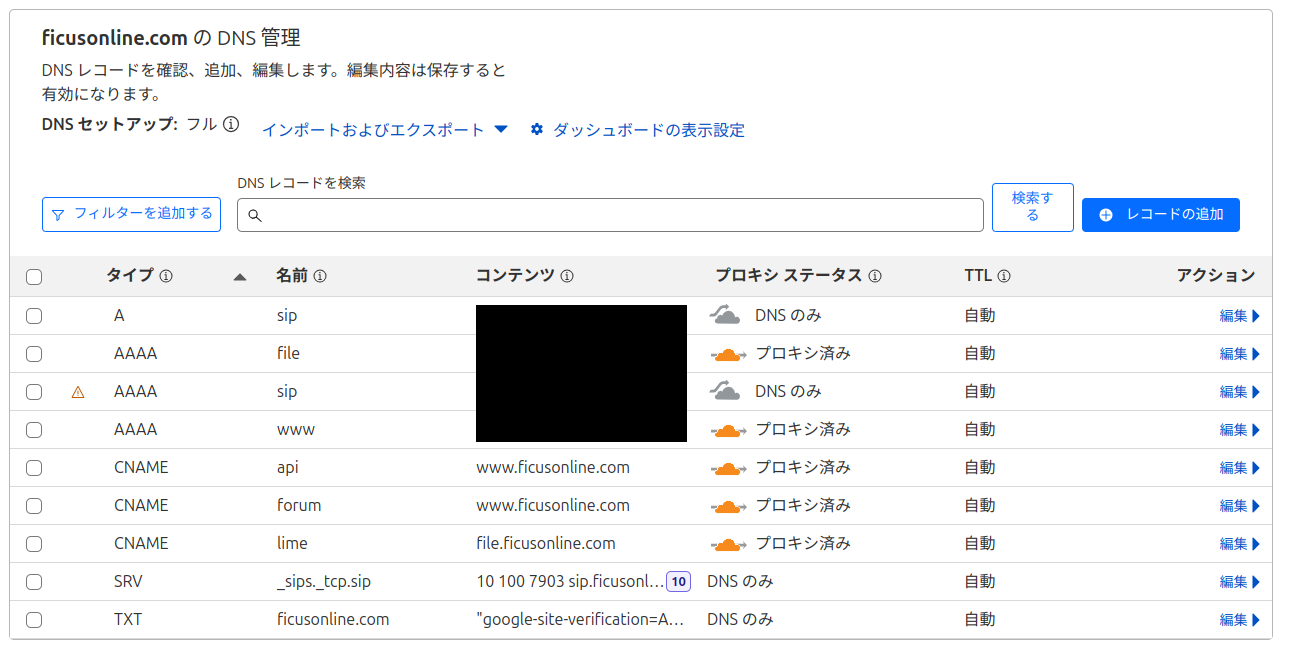
Cloudflareのプロキシを利用している場合には、Cloudflareで同様の設定をします。
> **注)Cloudfrareを利用する場合には、** Porkbunの設定はネームサーバをCloudflare指定のドメインに変更するのみです。 **DNSレコードの登録は必要ありません。**
* * *
**Flexisip** サーバは下記SRVの書式で、デフォルトポートを任意に設定可能(ポートをデフォルトから変更しても、アプリ側で指定する必要はありません)。
> **[Deploy Flexisip for one domain - XWiki](https://wiki.linphone.org/xwiki/wiki/public/view/Flexisip/HOWTOs/Deploy%20Flexisip%20for%20one%20domain/)**
>
> Deploy Flexisip for one domain
Set the DNS zone for your domain ([mydomain1.com](http://mydomain1.com))
```sh
@ IN A
IN AAAA
_sip._tcp IN SRV 0 0 0 .
_sip._udp IN SRV 0 0 0 .
_sips._tcp IN SRV 0 0 5061 mydomain1.com.
```
**Linphoneログから**
```sh
SRV _sips._tcp.sip.linphone.org resolved to [target:sip12.linphone.org. port:5061 prio:0 weight:100]
SRV _sips._tcp.sip.linphone.org resolved to [target:sip12.linphone.org. port:443 prio:20 weight:100]
SRV _sips._tcp.sip.linphone.org resolved to [target:sip9.linphone.org. port:5061 prio:10 weight:100]
```
### DNS レコードの確認
**digコマンド**
```sh
dig A sip.mydomain1.com
dig AAAA sip.mydomain1.com
dig SRV _sip._tcp.sip.mydomain1.com
dig SRV _sip._udp.sip.mydomain1.com
dig SRV _sips._tcp.sip.mydomain1.com
```
**DNS Checker**
[https://dnschecker.org/](https://dnschecker.org/)