# OpenWRT V6プラス (MAP-E) 接続設定
**URL:** https://forum.ficusonline.com/t/topic/498
**Category:** Linux
**Created:** [2023 年 10 月 17 日午後 9:43 UTC](https://forum.ficusonline.com/t/topic/498 "2023-10-17T21:43:30Z")
**Posts on this page:** 3
**Page:** 1
### Author:  [@tk-fuse](https://forum.ficusonline.com/u/tk-fuse)
#### Post date: [2023 年 10 月 17 日午後 9:43 UTC](https://forum.ficusonline.com/t/topic/498/1 "2023-10-17T21:43:30Z")
## V6プラス接続設定(MAP-E)
OpenWRTをインストールしたルータ **[TP-LINK Archer C6 V2](https://www.tp-link.com/jp/home-networking/wifi-router/archer-c6/v2/)** を **V6プラス** 接続に対応させます。

フレッツ光回線はインターネットからは独立したIPv6ネットワーク網で、VNEのIPv6ネットワーク網経由でIPv6インターネットに繋がっています。
OpenWRTクライアントとIPv4インターネットとの相互接続は、クライアント側に設置されるMAP CE(ONU)とVNEに設置されるMAP BR間で確立されます。
MAP CEとMAP BRはIPv6アドレスで相互接続されます。
MAP CEのIPv6アドレスのプレフィックスには、パブリックIPv4アドレスと割当てられるポート番号の情報が組込まれています。ルータのインターフェイスwan6mapeには、このパブリックIPv4アドレスが割当てられます。
ルータのインターフェイスwan6のIPv6アドレスは、VNEのDHCPサーバから付与されます。

- **MAP: Mapping of Address and Port**
- **MAP CE: MAP Consumer Edge**
- **MAP BR: MAP Border Relay**
- **NGN: Next Generation Network**
- **VNE: Virtual Network Enabler**
- **JPNE: Japan Network Enabler**
ルータの初期状態から下記手順で設定します。
> 1. アドオン **`map`** のインストール
> 1. wan6, lanインターフェイスの再設定
> 1. MAP-Eインターフェースwan6mapeの作成
> 1. IPv6ポート開放設定(オプション:http,httpsポートの開放など)
> 1. ファイヤーウォールルール追加(オプション:IPv4ロードバランスなど)
> **[A guide for Japan NTT users on IPoE/IPv6 setting (MAP-E only)](https://forum.openwrt.org/t/a-guide-for-japan-ntt-users-on-ipoe-ipv6-setting-map-e-only/150587)**
>
> For the fiber internet services in Japan, unless you are using 10G one (which is very new), most 1G fiber connections come with 2 ways of connection: PPPoE & IPoE. The PPPoE is IPv4 only (some providers have IPv6 PPPoE before but I think should...
> **[GitHub - fakemanhk/openwrt-jp-ipoe: Configure OpenWRT to work with Japan NTT IPv6...](https://github.com/fakemanhk/openwrt-jp-ipoe)**
>
> Configure OpenWRT to work with Japan NTT IPv6 service
* * *
> ### 1. アドオン **`map`** のインストール
**注)インストール後、ルータの再起動が必要です。**
#### SSH接続してインストールする場合
```auto
$ ssh root@192.168.1.1
# opkg update
# opkg install map
```
#### OpenWRTの管理画面からインストールする場合
System \> Softwareの **`"Update Lists"`** からパッケージの更新作業を行い、 **`map`** をフィルタリングしてインストールして下さい。

* * *
> ### 2. wan6, lanインターフェイスの再設定
#### インターフェイス `wan6` の設定
> **[\[OpenWrt Wiki\] IPv6 configuration](https://openwrt.org/docs/guide-user/network/ipv6/configuration)**
ルータへSSH接続し、ネットワーク設定ファイルのインターフェイス **`wan6`** のセクションに
```
option ip6prefix '2400:aaaa:bbbb:cccc::/64'
option iface_map 'wan6mape'
option zone_map 'wan'
```
を追加します。
```auto
$ ssh root@192.168.1.1
```
```auto
# vi /etc/config/network
config interface 'wan6'
option device 'eth1'
option proto 'dhcpv6'
option reqaddress 'try'
option reqprefix 'auto'
option ip6prefix '2400:aaaa:bbbb:cccc::/64'
option iface_map 'wan6mape'
option zone_map 'wan'
```
**`ip6prefix`** : VNEから付与された **`wan6`** のIPv6アドレス上位64ビット
**`iface_map`** : 新たに作成するMAP-Eインターフェイス **`wan6mape`**
**`zone_map`** : ファイヤーウォールゾーン **`wan`** を指定
* * *
#### OpenWRTの設定画面でwan6のDHCP設定を下記を参考に変更

#### OpenWRTの設定画面でlanのDHCP設定を下記を参考に変更

* * *
> ### 3. MAP-Eインターフェースwan6mapeの作成
まず初めに、wan6に割当てられたIPv6アドレスから、設定に必要な各パラメータを算出します。
以下の自動算出するサイトを利用して下さい。
[online MAP-E rule calculator](http://ipv4.web.fc2.com/map-e.html)

MAP-EによるIPv6アドレス内にIPv4アドレスとポートを割当てる仕組みについては、下記ドキュメントで詳しく説明されています。
**徹底解説v6プラス**
[https://www.jpne.co.jp/ebooks/v6plus-ebook.pdf](https://www.jpne.co.jp/ebooks/v6plus-ebook.pdf)
[RFC 7597 - Mapping of Address and Port with Encapsulation (MAP-E) 日本語訳](https://tex2e.github.io/rfc-translater/html/rfc7597.html)
**OpenWRTで新規インターフェイス `wan6mape` を作成**
下記の各項目に取得したパラーメータを入力して下さい。
> **BR / DMR / AFTR** には `option peeraddr 2400:xxxx:xxxx:xxxx::64` を入力。

**`Tunnel Link`** に **`wan6`** を指定、 **`MTU`** を1460(任意)に設定。

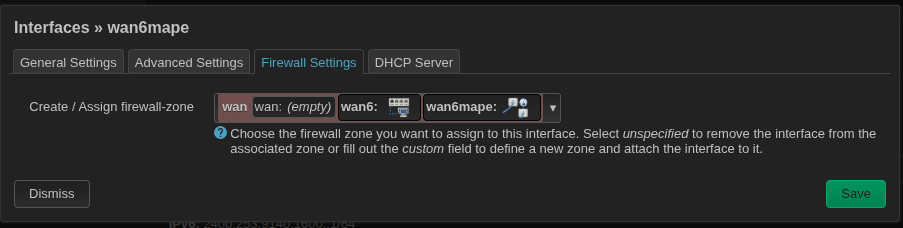
> 注)Firewall Setting のZoneはwan/wan6/wan6mape を選択
* * *
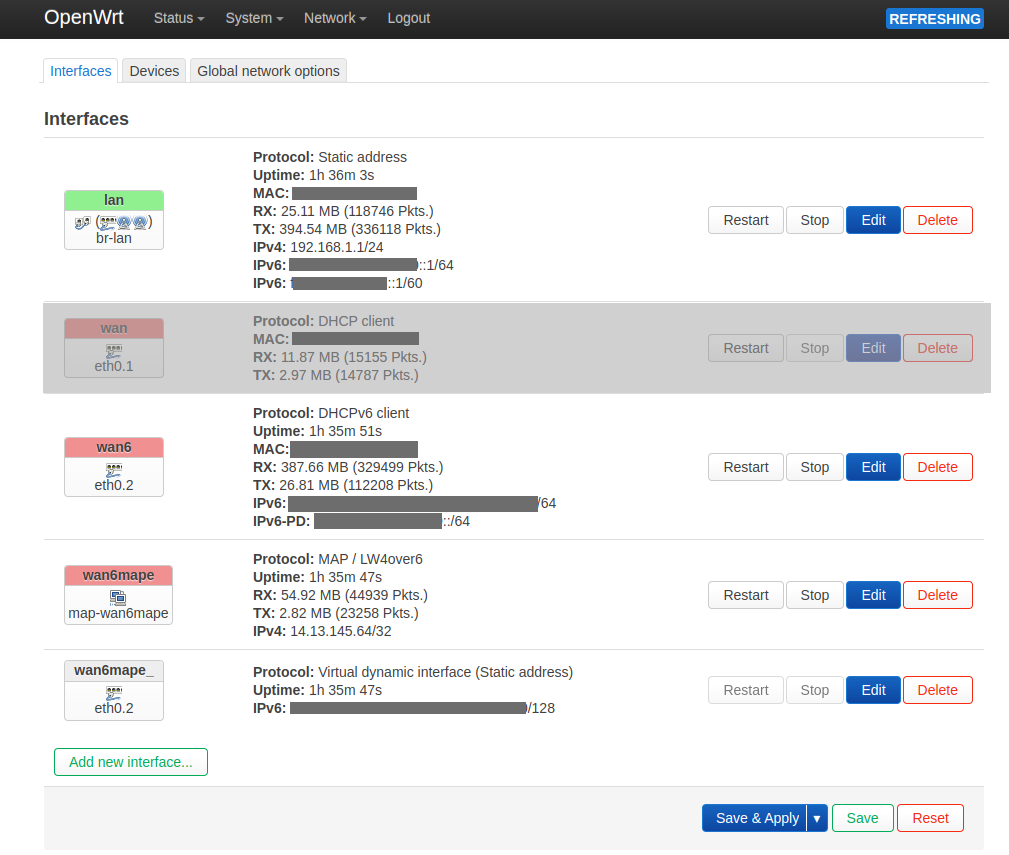
ここまでの設定で **`wan6`** インターフェイスを **`Restart`** することでIPv4での接続が確立されます。
**`wan6mape`** にIPv4アドレスが付与され、IPv6アドレスを付与されたwan6mapeの仮想インターフェイス **`wan6mape_`** が出現。
**`wan6mape`** のRXとTXに何らかの通信量が表示されれば接続出来ています。
* * *
> ### 4. IPv6ポート開放設定(オプション:http,httpsポートの開放など)
クライアントにはパブリックなIPv6も付与されます。ポート開放は
**Network \> Firewall \> Traffic Rules**
から行います。

> **[IPv6 and port forwarding](https://forum.openwrt.org/t/ipv6-and-port-forwarding/27770)**
>
> Hi, I'm running Lede/Openwrt 17.01.4 and have port forwarding set up for ports 22, 80 and 443 to a server. IPv4 addresses are appropriately forwarded to the server but not IPv6 addresses. I.e., running tcpdump on both the router and the server,...
* * *
> ### 5. ファイヤーウォールルール追加(オプション:IPv4ロードバランスなど)
ファイヤーウォールについては次の投稿記事を参照願います。
> [@OpenWRT V6プラス (MAP-E) 接続設定](https://forum.ficusonline.com/t/topic/498/2#nft-fw4-2):
>
> OpenWRTルータへのSSH接続 MAP-E対応にするためには、SSH接続でのリモート操作が必須です。以下SSH接続後に必要となるコマンドとMAP-Eに対応するために編集が必要なファイルを列挙します。 ルータへの接続 $ ssh root@192.168.1.1 ファイヤーウォールルールのリロード(システムデーモン) # /etc/init.d/firewall reload # se…
### IPV6ファイヤーウォール設定
> **[\[OpenWrt Wiki\] Firewall configuration /etc/config/firewall](https://openwrt.org/docs/guide-user/firewall/firewall_configuration)**
### IPV6ファイヤーウォール設定例
> **[\[OpenWrt Wiki\] IPv6 firewall examples](https://openwrt.org/docs/guide-user/firewall/fw3_configurations/fw3_ipv6_examples)**
#### IPv6 firewall testing
You can confirm the state of your IPv6 firewall using a couple of tools:
> **[Online IPv6 Port Scanner & Firewall Tester](https://ipv6.chappell-family.com/ipv6tcptest/)**
>
> IPscan is a free, open-source, online IPv6 port scanner, or web-hosted firewall tester. It checks your firewall's responses to an ICMPv6 ping and attempts to connect to multiple, user-selectable, TCP and UDP services.
[http://www.ipv6scanner.com/cgi-bin/main.py](http://www.ipv6scanner.com/cgi-bin/main.py)
---
### Author:  [@tk-fuse](https://forum.ficusonline.com/u/tk-fuse)
#### Post date: [2023 年 10 月 24 日午前 7:45 UTC](https://forum.ficusonline.com/t/topic/498/2 "2023-10-24T07:45:29Z")
## OpenWRTルータへのSSH接続
MAP-E対応にするためには、SSH接続でのリモート操作が必須です。以下SSH接続後に必要となるコマンドとMAP-Eに対応するために編集が必要なファイルを列挙します。
ルータへの接続
```auto
$ ssh root@192.168.1.1
```
ファイヤーウォールルールのリロード(システムデーモン)
```auto
# /etc/init.d/firewall reload
# service firewall reload
```
ファイヤーウォール設定ファイル
> `/etc/config/firewall`
ネットワーク設定ファイルのリロード(システムデーモン)
```auto
#/etc/init.d/network/reload
# service network reload
```
ネットワーク設定ファイル
> `/etc/config/network`
パッケージアップデート、アップグレード、インストール
```auto
# opkg update
# opkg upgrade
# opkg install
```
* * *
### ファイヤーウォールコマンド:nft, fw4
OpenWRTのファイヤーウォール **`fw4`** の実体は、 **`nftables`** のテーブル **`"table inet fw4”`** を作成・編集し、nftablesを起動・停止、設定ファイルの再読込などを行うスクリプトです。`(/sbin/fw4)`
ファイヤーウォール : fw4
> **[\[OpenWrt Wiki\] Firewall overview](https://openwrt.org/docs/guide-user/firewall/overview)**
設定例
> **[\[OpenWrt Wiki\] IPv4 firewall examples](https://openwrt.org/docs/guide-user/firewall/fw3_configurations/fw3_config_examples)**
ファイヤーウォールのルール追加は、 **`uci`** コマンドか **`nft`** コマンドで行います。
全テーブルルール確認
```auto
# nft list ruleset
```
全ルールの削除
```auto
# nft flush ruleset
```
**`fw4`** が実行するルールセット
```auto
# fw4 print
```
```auto
table inet fw4
flush table inet fw4
table inet fw4 {
#
# Defines
#
....................
....................
#
# User includes
#
include "/etc/nftables.d/*.nft"
.....................
....................
```
ルール追加は、デフォルトで読み込まれる設定ファイル
> **`/etc/nftables.d/*.nft`**
を作成することでも可能です(ただしテーブル **`inet fw4`** 限定です)。
* * *
MAP-Eを導入する場合、割当てられたパブリックIPv4のポート郡に効率的に通信パケットを割振るため(+ pingを実行可)、ロードバランスルールをICMP,TCP,UDPの各プロトコルに適用したテーブルを追加します。
```auto
table inet mape {
chain srcnat {
type nat hook postrouting priority filter; policy accept;
ip protocol icmp oifname "map-wan6mape" snat ip to 10.20.30.40:numgen inc mod 240 map { 0 : xxxx, 1 : xxxx, ......., 239 : xxxx }
ip protocol tcp oifname "map-wan6mape" snat ip to 10.20.30.40:numgen inc mod 240 map { 0 : xxxx, 1 : xxxx, ......., 239 : xxxx }
ip protocol udp oifname "map-wan6mape" snat ip to 10.20.30.40:numgen inc mod 240 map { 0 : xxxx, 1 : xxxx, ......., 239 : xxxx }
}
}
```
このテーブルを追加する以下のスクリプトを _ **/lib/netifd/proto/map.sh** _ と入替えます。
>
```auto
# cd /lib/netifd/proto
# cp map.sh map.sh.old (バックアップ)
# vi map.sh (内容を削除してコピー&ペースト)
# nft flush ruleset (全ルールセット削除)
# service network restart (ネットワーク再起動)
```
注)OpenWRTのファイヤーウォール **`fw4`** は、ルールセットテーブル **`inet fw4`** のみ管理するため、上記スクリプトでは再起動する度にテーブル **`inet mape`** にルールが追加されてしまいます。
修正)下記箇所にテーブルを削除する条件文スクリプト **`if ~ nft delete table inet mape ~fi`** 追加
`/lib/netifd/proto/map.sh`
```auto
#------------------------------------
#MODIFICATION 2: Create mape table
#------------------------------------
if nft list tables | grep -q "table inet mape"; then
nft delete table inet mape
fi
nft add table inet mape
nft add chain inet mape srcnat {type nat hook postrouting priority 0\; policy accept\; }
#------------------------------------
#END MODIFICATION 2
#------------------------------------
```
---
### Author:  [@tk-fuse](https://forum.ficusonline.com/u/tk-fuse)
#### Post date: [2026 年 10 月 4 日午前 5:45 UTC](https://forum.ficusonline.com/t/topic/498/3 "2026-10-04T05:45:02Z")
## アップグレードイメージの作成
> 注) OpenWrt 25.12 から、パッケージマネージャーが `opkg` から Alpine Linux 系の `apk` に変更されました。
> 注)ルータへのSSHアクセス(`$ ssh root@192.168.1.1`)は、ネットワークの設定ファイル (`/etc/config/network`) にオプションを追加する場合のみとなります。ファイヤーウォールの設定ファイル (`/etc/config/firewall`) は編集する必要はありません。
最新ビルドイメージをインストール後にmapパッケージをインストールすると、RAM容量不足によりエラーとなるため、Firmware Selectorでmapパッケージを組み込んだカスタムビルドを作成します。
下記サイトでカスタムビルドを作成しダウンロード
[https://firmware-selector.openwrt.org/](https://firmware-selector.openwrt.org/)
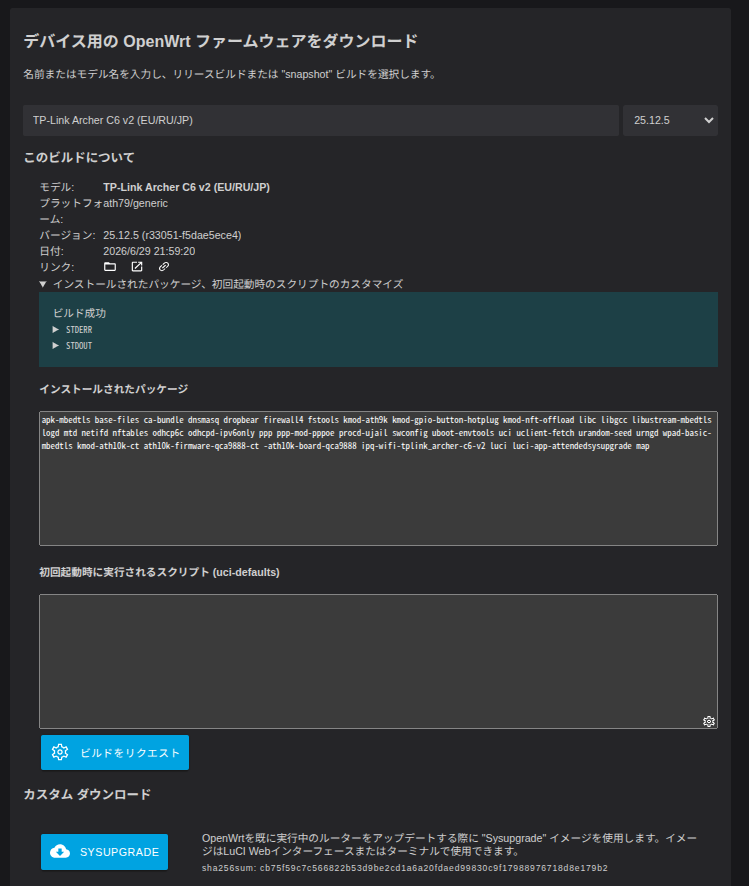
入力モデル:**`TP-Link Archer C6 v2 (EU/RU/JP)`**
**`インストールされたパッケージ、初回起動時のスクリプトのカスタマイズ`** をクリックし
**`インストールされたパッケージ`** に **`map`** を追加。
**`ビルドをリクエスト`** をクリックしてカスタムイメージを作成。