---
### Author:  [@tk-fuse](https://forum.ficusonline.com/u/tk-fuse)
#### Post date: [2023 年 11 月 23 日午前 2:09 UTC](https://forum.ficusonline.com/t/topic/499/4 "2023-11-23T02:09:11Z")
## Bardへの質問
Android-Studioによるアプリの開発の場合、コーディングに関しての疑問は、Bardを利用することで生産性が大幅に向上します。ChatGPTでも同じことが言えますが、Google提供の各種APIサービスを導入する場合にはBardを活用した方が良いでしょう。
**注)** トークンとは、あるサービスに登録しているユーザやデバイスを区別するために利用される、暗号化された一時的なIDとして捉えましょう。
> #### firebase対応のアプリがインストールされたデバイスのFCMトークンを取得するのにFirebaseMessagingServiceクラスまたはFirebaseMessagingクラスのどちらを使用するのが望ましいですか?
FirebaseMessagingServiceクラスとFirebaseMessagingクラスのどちらを使用するかは、アプリの要件に応じて異なります。
FirebaseMessagingServiceクラスは、Firebase Cloud Messaging サービスからの通知を受信するために使用されるクラスです。このクラスには、トークンを取得するためのメソッドがいくつか用意されています。
トークンを取得するためのメソッドは、次のとおりです。
- `onNewToken()`:デバイスのトークンが変更されたときに呼び出されるコールバック メソッドです。このメソッドは、新しいトークンを取得するために使用できます。
- `getToken()`:デバイスに割り当てられているデフォルトの FCM トークンを取得します。このトークンは、アプリがバックグラウンドで実行されている場合でも、アプリのライフサイクル全体を通じて有効です。
FirebaseMessagingクラスは、Firebase Cloud Messaging サービスを操作するために使用されるクラスです。このクラスには、トークンを取得するためのメソッドも用意されています。
トークンを取得するためのメソッドは、次のとおりです。
- `getToken()`:デバイスに割り当てられているデフォルトの FCM トークンを取得します。このトークンは、アプリがバックグラウンドで実行されている場合でも、アプリのライフサイクル全体を通じて有効です。
**FirebaseMessagingServiceクラスを使用する場合のメリット**
- Firebase Cloud Messaging サービスからの通知を受信するために使用できるため、アプリの通知機能を実装する場合に便利です。
- `onNewToken()` メソッドを使用することで、常に最新のトークンを取得できます。
**FirebaseMessagingクラスを使用する場合のメリット**
- FirebaseMessagingServiceクラスよりもシンプルなコードで記述できます。
- `getToken()` メソッドを使用することで、アプリのライフサイクル全体を通じて有効なトークンを取得できます。
**結論**
FirebaseMessagingServiceクラスを使用する場合は、Firebase Cloud Messaging サービスからの通知機能を実装する必要がある場合に便利です。FirebaseMessagingクラスを使用する場合は、Firebase Cloud Messaging サービスからの通知機能を実装する必要がない場合に便利です。
具体的には、次の場合にFirebaseMessagingServiceクラスを使用するのが望ましいと言えます。
- アプリでFirebase Cloud Messaging サービスからの通知機能を実装する必要がある場合
- 常に最新のトークンを取得する必要がある場合
具体的には、次の場合にFirebaseMessagingクラスを使用するのが望ましいと言えます。
- アプリでFirebase Cloud Messaging サービスからの通知機能を実装する必要がない場合
- アプリのライフサイクル全体を通じて有効なトークンを取得する必要がある場合
* * *
> #### Firebaseのトークンとは?
Firebase のトークンは、Firebase サービスとの通信に使用される、一意の識別子です。Firebase のトークンは、大きく分けて以下の 2 種類があります。
- **ID トークン**
ID トークンは、ユーザーまたはデバイスを識別するために使用されます。ユーザーがログインすると、Firebase はユーザーに ID トークンを生成します。ID トークンは、Firebase Realtime Database、Cloud Storage、Cloud Functions などのサービスへのアクセスに使用できます。
- **デバイス登録トークン**
デバイス登録トークンは、デバイスを識別するために使用されます。アプリが起動すると、Firebase はデバイスにデバイス登録トークンを生成します。デバイス登録トークンは、Firebase Cloud Messaging (FCM) を使用して、アプリに通知を送信するために使用できます。
Firebase のトークンは、JSON Web Token (JWT) 形式で作成されます。JWT は、署名付きの JSON オブジェクトです。署名は、トークンの改ざんを検出するために使用されます。
Firebase のトークンの有効期限は、トークンの種類によって異なります。ID トークンの有効期限は 1 時間です。デバイス登録トークンの有効期限は 2 か月です。
Firebase のトークンは、アプリのセキュリティを強化するために使用されます。トークンを使用すると、Firebase サービスは、ユーザーまたはデバイスが正当なユーザーであることを確認できます。
> #### 具体的なトークンの例を表示できますか?
はい、Firebase のトークンの例を表示します。
**ID トークンの例**
eyJhbGciOiJIUzI1NiIsInR5cCI6IkpXVCJ9.eyJ1c2VyX25hbWUiOiJhZG1pbkBnbWFpbC5jb20iLCJyb2xlIjoid2ViYXV0aG9yaXphdGlvbiIsImF1dGhvcl9pZCI6IjEiLCJleHAiOjE2MzY0NjM0MTMsImlzcyI6Imh0dHBzOi8vZXhhbXBsZS5jb20iLCJzdWIiOiIifQ.t12345678901234567890
このトークンは、以下の構成になっています。
- **ヘッダー**
- **ペイロード**
- **署名**
**デバイス登録トークンの例**
eyJhbGciOiJIUzI1NiIsInR5cCI6IkpXVCJ9.eyJ1c2VyX25hbWUiOiJ0ZXN0QGV4YW1wbGUuY29tIiwicm9sZSI6InRlc3RAZXhhbXBsZS5jb20iLCJhZG1pbiI6dHJ1ZSwiZXhwIjoxNjM2NDYyNDAzLCJpc3MiOiJodHRwczovL2V4YW1wbGUuY29tIiwiZXhwIjoxNjM2NDYyNDAzLCJzY29wZXMiOlsiYWNjZXNzIiwiZGF0YSIsImp0aSI6Ijc4Y2FmMjcyLTQ1YTMtNDY0MS1iYjU2LTYzY2U2MTk1ZmE0MCJ9.p98765432109876543210
このトークンは、以下の構成になっています。
- **ヘッダー**
- **ペイロード**
- **署名**
Firebase のトークンは、Firebase サービスとの通信に使用される重要なツールです。トークンの構成を理解しておくことで、Firebase サービスとの通信を安全に行うことができます。
---
### Author:  [@tk-fuse](https://forum.ficusonline.com/u/tk-fuse)
#### Post date: [2023 年 11 月 25 日午前 3:10 UTC](https://forum.ficusonline.com/t/topic/499/6 "2023-11-25T03:10:21Z")
## 各種キーの役割
ウェブAPIキーは、アプリがFirebaseのAPIにアクセスする際に利用されるキー。
アプリには `google-service.json` で読み込まれます。

サーバキーは **サーバトークン** としてサーバ側で指定する必要があります。
**Flexisipサーバ** の **`flexisip.conf`** とアカウントマネージャの **`.env`** ファイルで指定します。

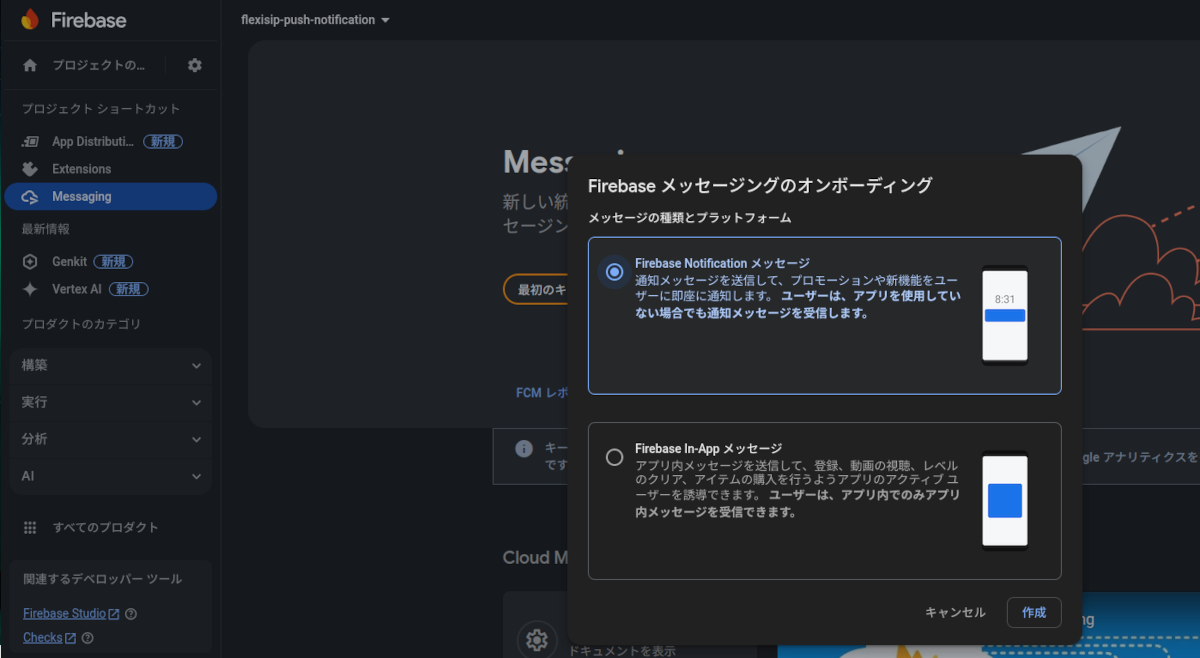
## FCMメッセージのテスト送信
メッセージタイトル、送信メッセージを入力し **テストメッセージを送信** ボタンをクリック

### FCM登録トークン(デバイストークン)を追加
Android-Studioの仮想デバイスのデバイストークンをログから取得し追加。
**テスト** ボタンをクリックするとデバイスにメッセージが表示されます。

[FCM 登録トークン管理のベスト プラクティス | Firebase Cloud Messaging](https://firebase.google.com/docs/cloud-messaging/manage-tokens?hl=ja&authuser=3)
---
### Author:  [@tk-fuse](https://forum.ficusonline.com/u/tk-fuse)
#### Post date: [2023 年 12 月 1 日午前 12:45 UTC](https://forum.ficusonline.com/t/topic/499/7 "2023-12-01T00:45:51Z")
## Conditions for using Firebase SMS OTP
アンドロイドアプリ、ウェブアプリでFirebaseのメッセージ送信機能を利用する場合の条件は以下の通りです。ウェブアプリ上で電話番号により新規にユーザ登録する場合には、電話番号が登録されている **デバイストークン** が取得できないため、SMS(OTP)機能は使用できません(既にFirebaseでユーザ登録されている場合は除く)。
The conditions for utilizing Firebase’s messaging functionality in Android and web applications are as follows:
In the case of registering a new user on a web application with their phone number, SMS (OTP) functionality cannot be used if **the device token** associated with the phone number cannot be obtained (excluding cases where the user is already registered with Firebase).
| | Registration from Android App | Registration from Web App | Login from Android App | Login from Web App |
| --- | --- | --- | --- | --- |
| **Firebase FCM** | O | \*X | O | O |
| **Firebase SMS(OTP)** | O | \*X | O | O |
\***X)** If an user device has been already registered as Firebase user, it will be OK.
**Android App** : Linphone
**Web App** : Flexisip (Account Manager API)
---
### Author:  [@tk-fuse](https://forum.ficusonline.com/u/tk-fuse)
#### Post date: [2023 年 12 月 5 日午前 8:37 UTC](https://forum.ficusonline.com/t/topic/499/8 "2023-12-05T08:37:05Z")
### [Android アプリでメッセージを受信する | Firebase Cloud Messaging](https://firebase.google.com/docs/cloud-messaging/android/receive?authuser=3&hl=ja)
デフォルトではアプリがバックグラウンドで動作している場合に限りシステムトレイにメッセージが表示されます。
| アプリの状態 | 通知 | データ | 両方 |
| --- | --- | --- | --- |
| フォアグラウンド | `onMessageReceived` | `onMessageReceived` | `onMessageReceived` |
| バックグラウンド | システムトレイ | `onMessageReceived` | 通知: システムトレイ、データ: インテントの追加部分内 |
### [https://firebase.google.com/docs/cloud-messaging/concept-options?authuser=3&hl=ja#notifications\_and\_data\_messages](https://firebase.google.com/docs/cloud-messaging/concept-options?authuser=3&hl=ja#notifications_and_data_messages)
| \>\>\>\>\>\> | 使用シナリオ | 送信方法 |
| --- | --- | --- |
| 通知メッセージ | クライアント アプリがバックグラウンドで実行されている場合、FCM SDK は、クライアント アプリに代わってエンドユーザーのデバイスにメッセージを表示します。通知を受信しているときにアプリがフォアグラウンドで実行されている場合、アプリのコードによってアプリの動作が決定されます。通知メッセージでは、いくつかのユーザー表示用キーが事前定義されており、カスタムの Key-Value ペアのデータ ペイロードを任意に指定できます。 | 1. [Cloud Functions](https://firebase.google.com/docs/functions?authuser=3&hl=ja) やアプリサーバーなどの信頼できる環境で、[Admin SDK](https://firebase.google.com/docs/cloud-messaging/admin?authuser=3&hl=ja) または [FCM サーバー プロトコル](https://firebase.google.com/docs/cloud-messaging/server?authuser=3&hl=ja#choose)を使用し、`notification` キーを設定します。オプションのデータ ペイロードを指定できます。常に折りたたみ可能になります。[表示通知の例](https://firebase.google.com/docs/cloud-messaging/send-message?authuser=3&hl=ja#example-notification-message-with-platform-specific-delivery-options)を参照して、リクエストのペイロードを送信します。 2. [Notifications Composer](https://console.firebase.google.com/project/_/notification?authuser=3&hl=ja) を使用し、メッセージのテキストやタイトルなどを入力して送信します。カスタムデータを指定することで、オプションのデータ ペイロードを追加できます。 |
| データ メッセージ | クライアント アプリがデータ メッセージの処理を行います。データ メッセージには、予約済みのキー名のないカスタム Key-Value ペアのみが含まれます(以下を参照)。 | [Cloud Functions](https://firebase.google.com/docs/functions?authuser=3&hl=ja) やアプリサーバーなどの信頼できる環境で、[Admin SDK](https://firebase.google.com/docs/cloud-messaging/admin?authuser=3&hl=ja) または [FCM サーバー プロトコル](https://firebase.google.com/docs/cloud-messaging/server?authuser=3&hl=ja#choose)を使用し、`data` キーのみを設定します。 |
### [REST Resource: projects.messages | Firebase Cloud Messaging REST API](https://firebase.google.com/docs/reference/fcm/rest/v1/projects.messages?hl=ja#methods)
#### AndroidConfig
```auto
{
"collapse_key": string,
"priority": enum (AndroidMessagePriority),
"ttl": string,
"restricted_package_name": string,
"data": {
string: string,
...
},
"notification": {
object (AndroidNotification)
},
"fcm_options": {
object (AndroidFcmOptions)
},
"direct_boot_ok": boolean
}
```
>
>
[https://developer.android.com/training/notify-user/build-notification?hl=ja](https://developer.android.com/training/notify-user/build-notification?hl=ja)
[https://developer.android.com/training/notify-user/channels?hl=ja](https://developer.android.com/training/notify-user/channels?hl=ja)
[https://developer.android.com/reference/kotlin/androidx/core/app/NotificationCompat.Builder](https://developer.android.com/reference/kotlin/androidx/core/app/NotificationCompat.Builder)
---
### Author:  [@tk-fuse](https://forum.ficusonline.com/u/tk-fuse)
#### Post date: [2025 年 4 月 28 日午前 6:18 UTC](https://forum.ficusonline.com/t/topic/499/9 "2025-04-28T06:18:55Z")
## Firebaseコンソール画面更新
Firebaseで作成したプロジェクトでマイアプリ(Androidプラットホーム)を登録。
アプリのキーと ID が含まれている構成ファイル **`google-services.json`** をダウンロード。
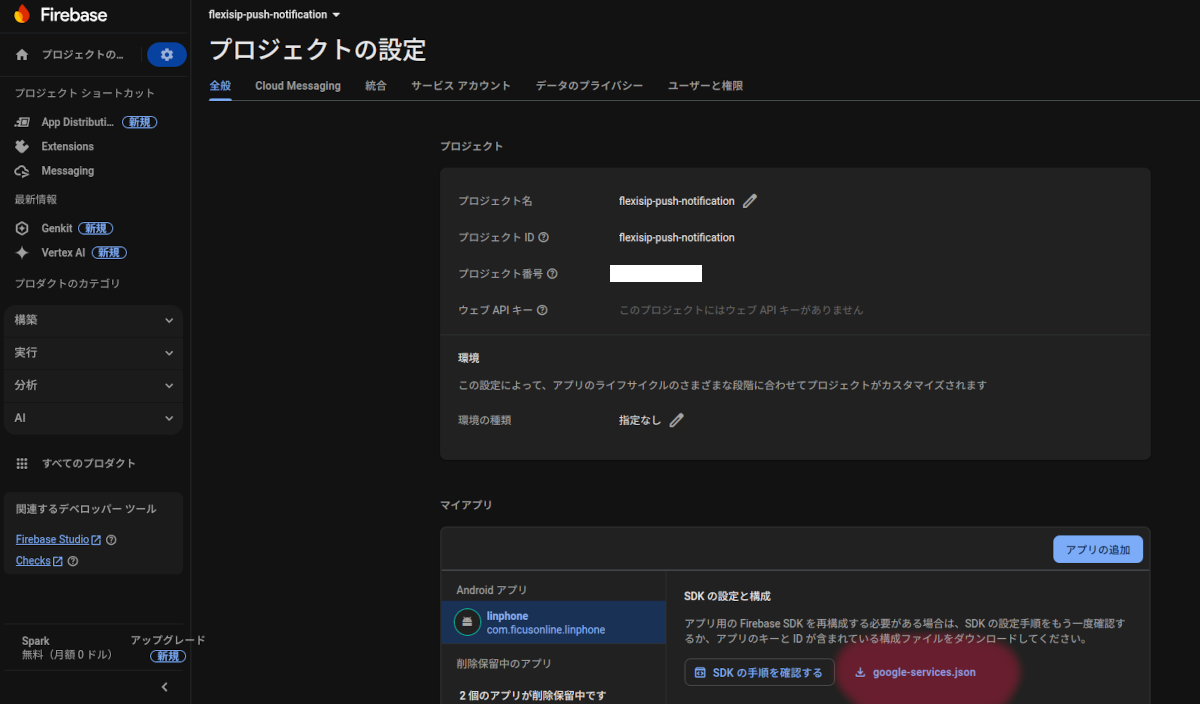
構成ファイルを以下の指定ディレクトリへ移動。
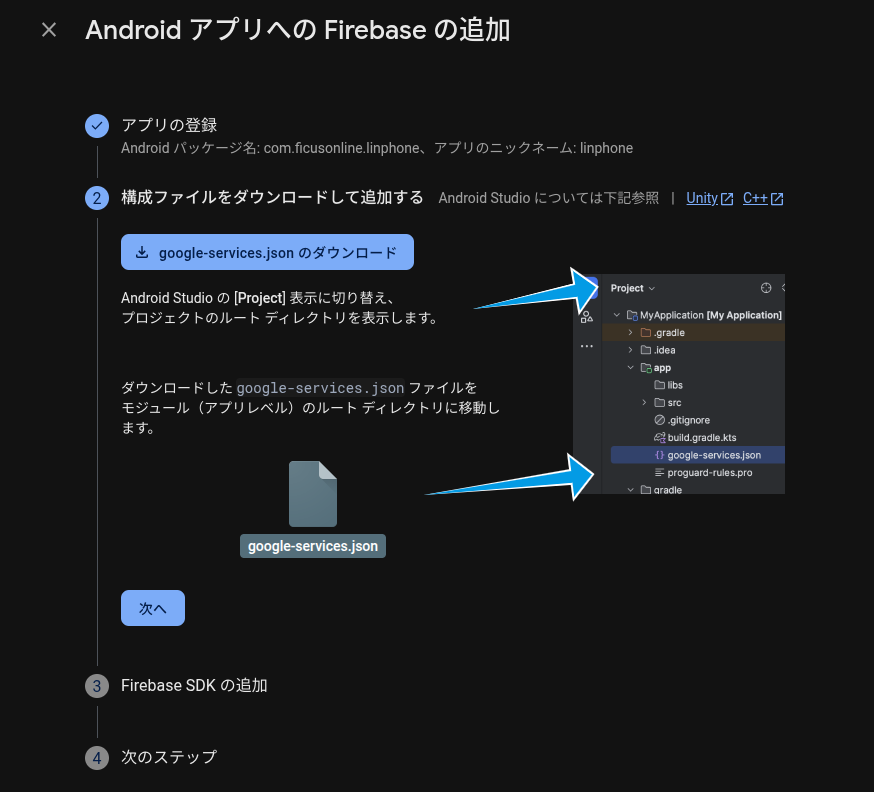
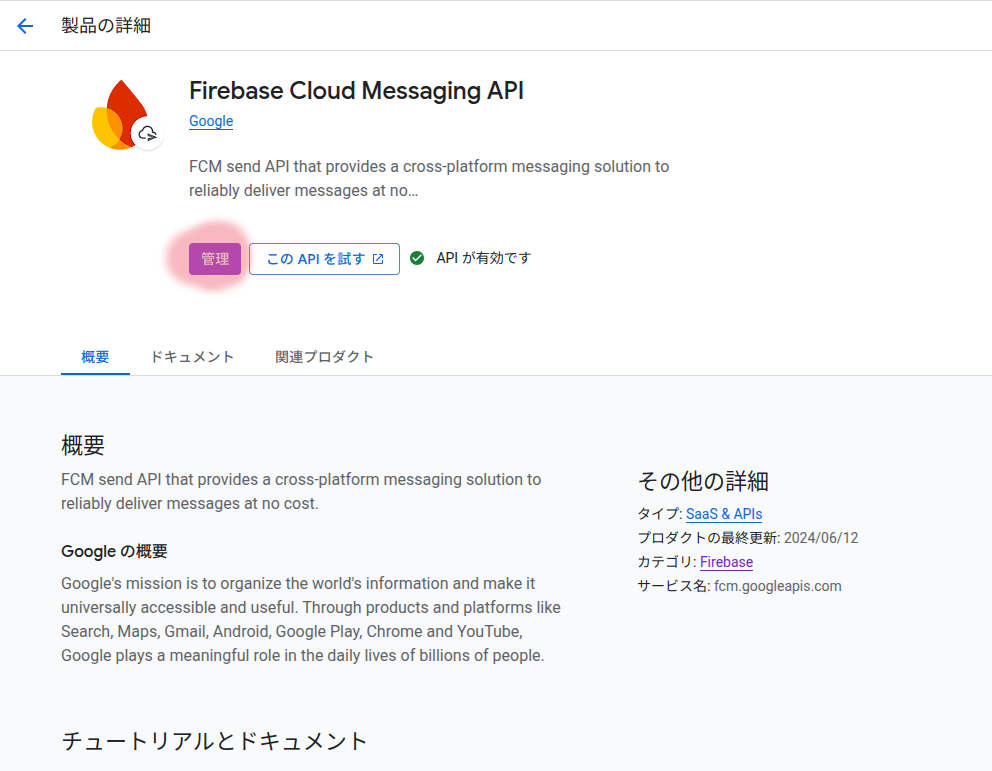
Firebase Cloud Messaging API(V1)の確認。
Cloud Console API管理画面へ(画面マーキング箇所をクリック)
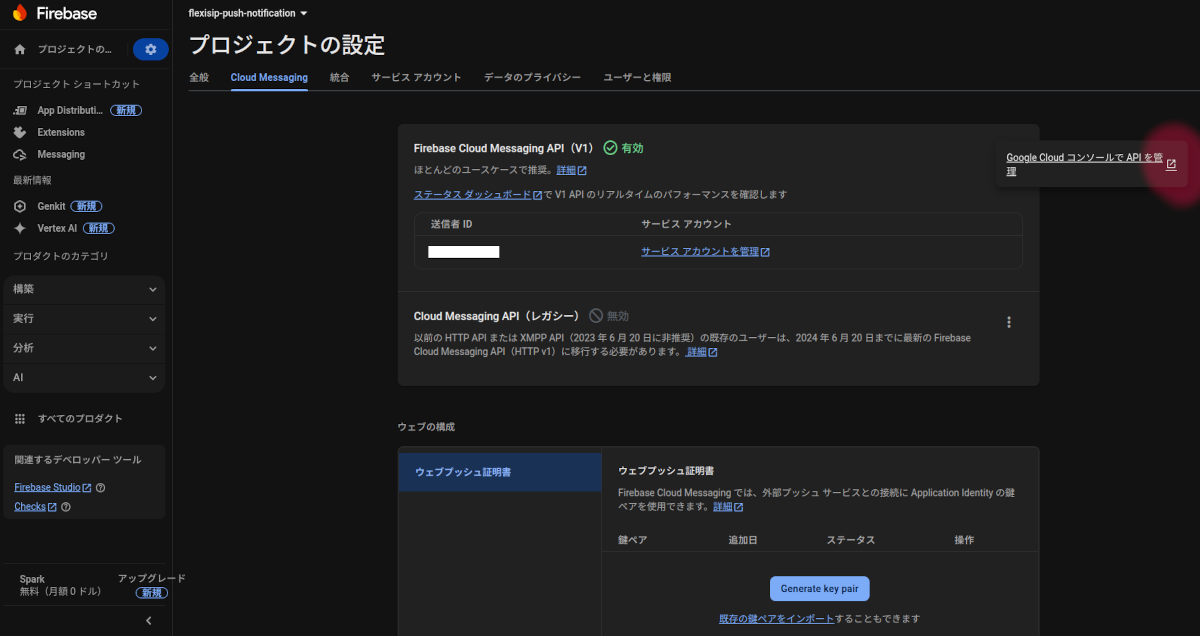
管理をクリック
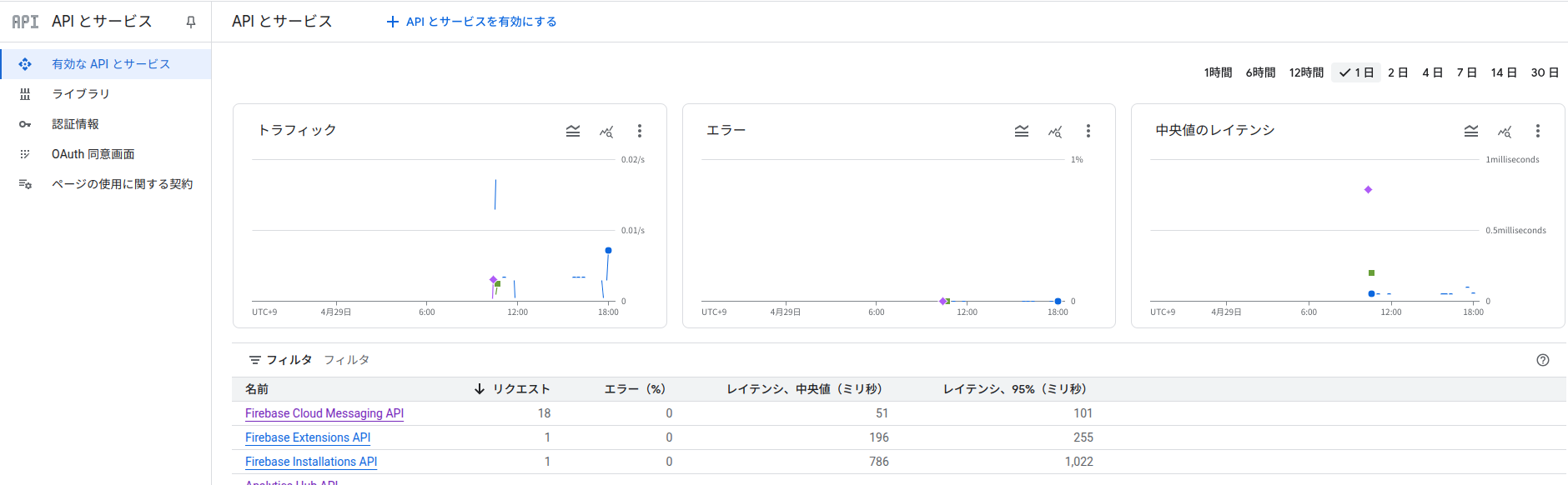
リクエストステータス
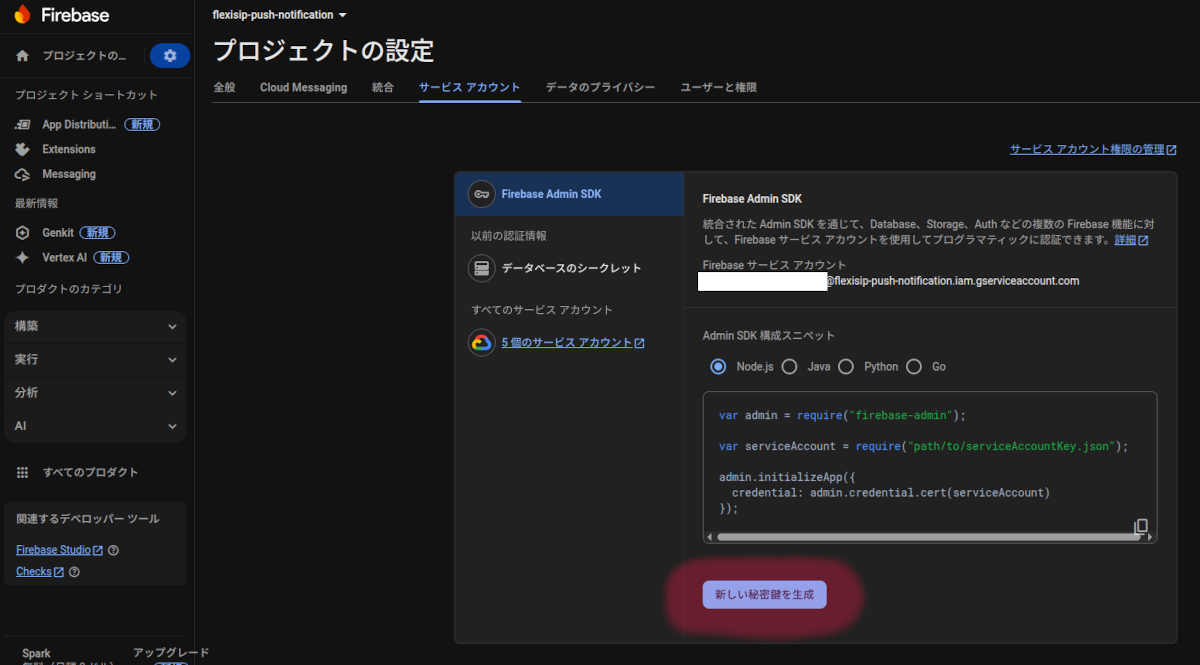
サービスアカウントタブで秘密鍵の作成(これはアプリの登録時に自動で作成されます)
メッセージのテスト(デバイストークンが必要です)