# LoRa + MQTT + OpenRemote によるIoTシステムの構築

**URL:** https://forum.ficusonline.com/t/topic/568
**Category:** Automation
**Tags:** lora, openremote, mqtt, automation
**Created:** [2026 年 9 月 24 日午前 2:23 UTC](https://forum.ficusonline.com/t/topic/568 "2026-09-24T02:23:50Z")
**Posts on this page:** 13
**Page:** 1

<div class="post-metadata">

### Author: ![tk-fuse](https://forum.ficusonline.com/user_avatar/forum.ficusonline.com/tk-fuse/32/255_2.png) [@tk-fuse](https://forum.ficusonline.com/u/tk-fuse)
#### Post date: [2026 年 9 月 24 日午前 2:23 UTC](https://forum.ficusonline.com/t/topic/568/1 "2026-09-24T02:23:50Z")

</div>

ThingsBoard CEはApache License 2.0のオープンソースだが、PEでは有償ライセンスが必要で、CEとPEで機能差があります。一方、OpenRemoteはAGPLv3で100%オープンソースとして提供されており、ライセンス費用なしで利用できるため、OpenRemoteも検討することにしました。

 ![openremote_system](https://forum.ficusonline.com/uploads/default/original/2X/7/7994c6bc2dbb4a25c82db19c291a026f2ad95ed0.jpeg)

OpenRemoteは、ベースとなる地図データやGeoJSONによる独自の地図レイヤーを利用し、地図上にセンサー、設備、機器などの任意のデバイスを配置・管理できるIoTプラットフォームです。デバイスごとに多様なプロパティや状態を定義でき、ルールエンジンによるデータ処理や自動制御にも対応しています。

これにより、フィールドオートメーション、スマートシティ、スマートビルディング、エネルギー管理など、位置情報とIoTデータを組み合わせた幅広いシステムを構築できます。

Dockerコンテナで稼動。デプロイするサービスと環境変数については下記参照。

> <https://github.com/openremote/core/blob/main/profile/deploy.yml>

#### ドキュメント

> **[Introduction | OpenRemote Documentation](https://docs.openremote.io/docs/introduction/)**
>
> Welcome to the OpenRemote documentation!

#### GitHub

> **[GitHub - openremote/core: 100% open-source IoT Platform - Integrate your...](https://github.com/openremote/core)**
>
> 100% open-source IoT Platform - Integrate your devices, add intelligence, build custom apps

#### フォーラム

> **[OpenRemote](https://forum.openremote.io/)**
>
> A place for discussing OpenRemote topics, issues and tips

#### モバイルアプリ

Android

> <https://play.google.com/store/apps/details?id=io.openremote.app&hl=en>
>
> Connect your OpenRemote (v3) hosted project to monitor and control your assets...

iOS

> **[OpenRemote App App - App Store](https://apps.apple.com/us/app/openremote-app/id1526315885)**
>
> Download OpenRemote App by OpenRemote on the App Store. See screenshots, ratings and reviews, user tips, and more apps like OpenRemote App.

---

<div class="post-metadata">

### Author: ![tk-fuse](https://forum.ficusonline.com/user_avatar/forum.ficusonline.com/tk-fuse/32/255_2.png) [@tk-fuse](https://forum.ficusonline.com/u/tk-fuse)
#### Post date: [2026 年 9 月 24 日午後 12:08 UTC](https://forum.ficusonline.com/t/topic/568/2 "2026-09-24T12:08:02Z")

</div>

## マップデータのインポート

> **[Working on maps | OpenRemote Documentation](https://docs.openremote.io/docs/developer-guide/working-on-maps/)**
>
> MapLibre GL

#### OpenMapTiles

ここからマップデータを取得

> **[Free OpenStreetMap vector tiles & world maps](https://openmaptiles.org/)**
>
> Open-source OpenStreetMap vector tiles, map styles, tools, and schema for building world maps. Works with MapLibre GL, Leaflet, OpenLayers, GIS, and WMTS.

入手したデータのファイル名 `***.mbtiles`を`input.mbtiles`へ変更。  
mapディレクトリを作成し、この中へ移動。

`./map/input.mbtiles`

ダウンロードしたマップデータの一部領域のみ必要な場合は、以下のNodeJSコンテナを利用して変換処理を行います。

領域の経緯は以下のサイトから算出

> **[OSM - Tile Calculator](https://tools.geofabrik.de/calc/#tab=1)**

left(West)=5.53 bottom(South)=47.23 right(East)=15.38 top(North)=54.96

```auto
$ docker run -it --rm --network host -v ./map:/mapdata nikolaik/python-nodejs:python3.8-nodejs12 bash
# npm install -g --unsafe @mapbox/mbtiles @mapbox/tilelive
# tilelive-copy --minzoom=0 --maxzoom=14 --bounds="5.53,47.23,15.38,54.96" /mapdata/input.mbtiles /mapdata/output.mbtiles

```

`output.mbtiles` を `mapdata.mbtiles` へ変更し `/deployment/map` ディレクトリへコピー

地図データ設定ファイルの座標も変更すること。中心座標は経緯度の平均値。

`deployment/map/mapsettings.json`

```json
{
  "options" : {
    "default" : {
      "center" : [139.785, 35.655],
      "bounds" : [139.71, 35.59, 139.86,35.72],
      "zoom" : 15,
      "minZoom" : 0,
      "maxZoom" : 19,
      "boxZoom" : false,
      "geocodeUrl" : "https://nominatim.openstreetmap.org"
    },

```

### URLを指定して地図データを取得する場合

URLを指定して保存すると、デフォルトのマップデータがOpenFreeMapに切り替わります。  
URLを指定してImportボタンを押し保存すると、URLで指定した書式のみ反映されます。

> **[OpenFreeMap Quick Start Guide](https://openfreemap.org/quick_start/)**
>
> OpenFreeMap – Open-Source Map Hosting lets you display custom maps on your website and apps for free.

URL: [https://tiles.openfreemap.org/styles/positron](https://tiles.openfreemap.org/styles/positron)

 ![Screenshot from 2026-09-27 10-14-12](https://forum.ficusonline.com/uploads/default/original/2X/9/932870838b080157fa57cf4dc08b33db2aa8441e.png)

 ![Screenshot from 2026-09-27 10-24-09](https://forum.ficusonline.com/uploads/default/original/2X/b/b612bdcf334b1f44120b79b2ba19cf4aa158fc13.jpeg)

> **[How to customise the map](https://forum.openremote.io/t/how-to-customise-the-map/897)**
>
> Hi, I have tried to follow the “Customising the map” step did those related development. Download the map and mapsettings Adjust the filestructure of deployment as follows: deployment |-- manager | |-- app | | +-- images | | |--...

* * *

## ウェザーマップAPI

> **[🌤️ Free Open-Source Weather API | Open-Meteo.com](https://open-meteo.com/)**
>
> Open-Source ☀️ Weather API with free access for non-commercial use. No API Key required ✅. Accurate weather forecasts for any location. Open-Meteo provides high-resolution open data ranging from 1 to 11 kilometres from national weather services. With...

> **[OpenWeather APIs for Weather, Energy, and Environment](https://openweathermap.org/)**
>
> OpenWeather provides global APIs for weather, environmental, and energy data, including current conditions, forecasts, historical weather, air pollution, solar radiation, road risk, and solar energy insights. Built for developers and businesses, our...

> **[Using HTTP Agent for weather service | OpenRemote Documentation](https://docs.openremote.io/docs/tutorials/open-weather-api-using-http-agent/)**
>
> This tutorial explains how to use the generic HTTP Agent with an example to connect to the OpenWeatherMap API.

 ![Screenshot from 2026-09-29 09-21-36](https://forum.ficusonline.com/uploads/default/original/2X/3/3b309aa5d641ec1dbf3aea7ba497c34767f09edf.png)

`Request query parameters`

```json
{
  "current": [
    "temperature_2m,relative_humidity_2m,apparent_temperature,precipitation,wind_speed_10m,wind_direction_10m,wind_gusts_10m,uv_index,shortwave_radiation"
  ],
  "wind_speed_unit": [
    "ms"
  ],
  "timezone": [
    "Asia/Tokyo"
  ],
  "latitude": [
    "35.662162168484286"
  ],
  "longitude": [
    "139.77089481216473"
  ]
}

```

> 注）temperature\_2mなど各種パラメータの書式はOpen-Meteoから入手すること。

---

<div class="post-metadata">

### Author: ![tk-fuse](https://forum.ficusonline.com/user_avatar/forum.ficusonline.com/tk-fuse/32/255_2.png) [@tk-fuse](https://forum.ficusonline.com/u/tk-fuse)
#### Post date: [2026 年 9 月 26 日午前 11:30 UTC](https://forum.ficusonline.com/t/topic/568/3 "2026-09-26T11:30:52Z")

</div>

各デバイスをアセットとして地図上の任意の位置へ配置

6つのデバイス（アセット）を配置

 ![Screenshot from 2026-09-26 20-33-15](https://forum.ficusonline.com/uploads/default/original/2X/7/7847af71eb19a6df8b99d17f3d89fa5ff765bee7.jpeg)

フィールドを俯瞰表示して各デバイスを表示（カラーバルーン）

 ![Screenshot from 2026-09-26 20-12-22](https://forum.ficusonline.com/uploads/default/original/2X/6/69948f9690c3195b0f6b54b37dfb35ec76f6c8b5.jpeg)

デバイス設置位置とステータス表示

 ![Screenshot from 2026-09-26 20-12-51](https://forum.ficusonline.com/uploads/default/original/2X/a/acf8ff1cc5d09b57d88f0094c49e81c6727f769a.png)

モニターしたい任意のデバイスのステータスをグラフやゲージなどで表示

 ![Screenshot from 2026-09-28 22-53-22](https://forum.ficusonline.com/uploads/default/original/2X/e/edefda9af0bf3fe36fda1f00fbd83dee921618bc.jpeg)

---

<div class="post-metadata">

### Author: ![tk-fuse](https://forum.ficusonline.com/user_avatar/forum.ficusonline.com/tk-fuse/32/255_2.png) [@tk-fuse](https://forum.ficusonline.com/u/tk-fuse)
#### Post date: [2026 年 9 月 27 日午前 7:36 UTC](https://forum.ficusonline.com/t/topic/568/4 "2026-09-27T07:36:36Z")

</div>

## Agent/Protocol

> **[Agents/Protocols | OpenRemote Documentation](https://docs.openremote.io/docs/category/agentsprotocols/)**

#### MQTT

> **[Manager APIs | OpenRemote Documentation](https://docs.openremote.io/docs/user-guide/manager-apis/)**
>
> The OpenRemote Manager API is composed of the following APIs, each API requires authentication (with the exception of read/write of public asset attributes see Asset security).

> 注）OpenRemoteはデフォルトでMQTTブローカとして **Apache Artemis** が組込まれています。

> **[Artemis](https://artemis.apache.org/)**

#### OpenWeatherMap

OpenWeatherMapのAPIに対応したエージェントですが有料サービスへの登録が必要（有料サービスの中で無料枠が設定されています）

> **[OpenWeatherMap | OpenRemote Documentation](https://docs.openremote.io/docs/user-guide/agents-protocols/openweathermap/)**
>
> This agent enables integration with OpenWeatherMap, providing access to weather data via the One Call 3.0 API.

#### HTTP

Open-MeteoのAPIを利用したデータ取得はここを参照。

> **[HTTP | OpenRemote Documentation](https://docs.openremote.io/docs/user-guide/agents-protocols/http/)**
>
> Connect to a HTTP(S) Server.

#### E-MAIL

> 注）送信側SMTPの設定はManagerサービス（Dockerコンテナ）で設定

```yaml
# Configure Email, SMTP server to send password reset emails etc.
      OR_EMAIL_HOST: smtp.gmail.com
      OR_EMAIL_USER: example@gmail.com
      OR_EMAIL_PASSWORD: XXXXXXXXXXXXXXXX
      OR_EMAIL_PORT: 587
      OR_EMAIL_TLS: true
      OR_EMAIL_X_HEADERS: # Headers to set on all outbound emails
      OR_EMAIL_PROTOCOL: # smtp or smtps for SSL (if TLS not set or is true then smtp is assumed)

```

受信側クライアント設定（GmailのIMAP設定）  
ユーザ名とパスワードのJSON形式での記述

```json
{
  "username": "example@gmail.com",
  "password": "XXXXXXXXXXXXXXXX"
}

```

 ![Screenshot from 2026-09-29 09-11-54](https://forum.ficusonline.com/uploads/default/original/2X/3/389202b6c8f1d36f25744f1070ab7b9a9be8360d.png)

---

<div class="post-metadata">

### Author: ![tk-fuse](https://forum.ficusonline.com/user_avatar/forum.ficusonline.com/tk-fuse/32/255_2.png) [@tk-fuse](https://forum.ficusonline.com/u/tk-fuse)
#### Post date: [2026 年 9 月 29 日午前 12:50 UTC](https://forum.ficusonline.com/t/topic/568/5 "2026-09-29T00:50:24Z")

</div>

## カスタマイズ

マップ画面で表示される各マーカのデータ表示や出力値による色分けを追加。

 ![image](https://forum.ficusonline.com/uploads/default/original/2X/9/92933a1db1ac4aa0646ad62f79bc107525e4a092.png)

例）マップ上のマーカを風速で色分け

```json
  "pages": {
    "map": {
      "markers": {
        "WeatherAsset": {
          "attributeName": "windSpeed",
          "showLabel": true,
          "showUnits": true,
          "colours": {
            "type": "range",
            "ranges": [
              {
                "min": 0,
                "colour": "39B54A"
              },
              {
                "min": 10,
                "colour": "F7931E"
              },
              {
                "min": 20,
                "colour": "C1272D"
              }
            ]
          }
        }
      },

```

 ![Screenshot from 2026-09-29 09-51-09](https://forum.ficusonline.com/uploads/default/original/2X/6/69e135f0a5c9aa51dab3ddd123385a25a47ba703.jpeg)

---

<div class="post-metadata">

### Author: ![tk-fuse](https://forum.ficusonline.com/user_avatar/forum.ficusonline.com/tk-fuse/32/255_2.png) [@tk-fuse](https://forum.ficusonline.com/u/tk-fuse)
#### Post date: [2026 年 9 月 29 日午後 1:07 UTC](https://forum.ficusonline.com/t/topic/568/6 "2026-09-29T13:07:57Z")

</div>

## MQTTの設定

OpenRemoteにデフォルトで実装されているMQTTブローカは、主に登録したアセットを管理・制御するためのAPIとして利用します。

#### MQTT送受信テスト

MQTTによるAPIを利用したリモート端末からのアセットへのサブスクリプション・パブリッシュ。

リモート操作用のサービスユーザmqttuserをOpenRemote側で別途用意する必要があります。

 ![Screenshot from 2026-09-29 21-56-25](https://forum.ficusonline.com/uploads/default/original/2X/8/850ff7972d1a93a69c225c8a60ca7d6c5f060e98.png)

サービスユーザに割当てられるパスワードxxxxxxxx は、MQTTブローカへの認証に使用されます。

> **[Manager APIs | OpenRemote Documentation](https://docs.openremote.io/docs/user-guide/manager-apis/)**
>
> The OpenRemote Manager API is composed of the following APIs, each API requires authentication (with the exception of read/write of public asset attributes see Asset security).

テスト用のアセットを作成（Thing Assetを選択）—\> Add attribute: testValue (boolean)  
アセットID XXXXXXXX はURLの末尾に表示されます。

他の端末のターミナルからmqttクライアントコマンドを実行。

> 注）clientIdは任意ですが、サブとパブで同一のIdを使用しないこと。

**サブスクリプション**  
`{realm}/{clientId}/attribute/{attributeName}/{assetId}`  
`{realm}/{clientId}/attributevalue/{attributeName}/{assetId}`

```auto
$ mosquitto_sub -h iot.example.com -p 8883 -u "master:mqttuser" -P "xxxxxxxx" -i "test-client-01" -t "master/test-client-01/attribute/testValue/XXXXXXXX" -d

```

**パブリッシュ**  
`{realm}/{clientId}/writeattributevalue/{attributeName}/{assetId}`

```auto
$ mosquitto_pub -h iot.example.com -p 8883 -u "master:mqttuser" -P "xxxxxxxx" -i "test-client-02" -t "master/test-client-02/writeattributevalue/testValue/XXXXXXXX" -m "true"

```

#### 外部MQTTブローカの利用

Mosquittoなど別途ブローカを用意した場合は、AgentとしてMQTTブローカを指定、Assetとして、このAgentとそのトピックに対しパブリッシュ・サブスクライブします。

- オプションで`Username password`をチェック  

- `lastWllTopic`を入力しないと接続エラーになるため、任意で入力

- 外部のMQTTブローカ指定の場合、ポートに`8883`を入力

- 内部（`manager`コンテナと`mosquitto`コンテナが同じdockerネットワークに配備されている場合はポートに`1883`を入力し、セキュリティチェックを外して下さい）  

`CONNECTED`と表示されれば、接続が確立されています。

---

<div class="post-metadata">

### Author: ![tk-fuse](https://forum.ficusonline.com/user_avatar/forum.ficusonline.com/tk-fuse/32/255_2.png) [@tk-fuse](https://forum.ficusonline.com/u/tk-fuse)
#### Post date: [2026 年 10 月 3 日午前 12:14 UTC](https://forum.ficusonline.com/t/topic/568/7 "2026-10-03T00:14:59Z")

</div>

## STM32 DX-LR30 メッシュセンサーネットワーク

STM32F103C8 + DX-LR30 (SX1262) + BMI160 + ESP32-C6 による、Node(Sensor, Actuator) / Repeater / Gateway 兼用のLoRaメッシュセンサーネットワーク一式。Gatewayはメッシュのデータを **MQTTS (TLS)** でMQTTブローカーへ転送し、**Wi-Fi設定ポータル (APモード)** で設定します。

 ![openremote_lora_mqtt](https://forum.ficusonline.com/uploads/default/original/2X/0/02e0485e3b7b431241cd7d6bfe88f9d7ab464798.png)

#### 参照元リポジトリ:

> **[GitHub - NeutralSystem/STM32\_DX-LR20\_LORA: STM32 Radio, DX-LR20, SX1262 LORA Communication.](https://github.com/NeutralSystem/STM32_DX-LR20_LORA)**
>
> STM32 Radio, DX-LR20, SX1262 LORA Communication.

### ディレクトリ構成

```auto
project/
├── platformio.ini # STM32側: CLI / mesh / mesh_debug の3ビルド環境
├── src/
│ ├── cli_main.cpp # 元のインタラクティブLoRa CLI（変更なし）
│ └── mesh_main.cpp # Node/Repeater/Gateway統合ファームウェア（本体）
└── esp32_gateway/ # ESP32-C6用の独立したPlatformIOプロジェクト (ESP-IDF)
    ├── platformio.ini
    ├── sdkconfig.defaults # TLS証明書バンドル、mainタスクのスタックサイズ
    └── src/
        ├── main.cpp # Wi-Fi (STA)・SNTP・MQTTS publish/subscribe・STM32とのUART橋渡し
        ├── gw_prov.cpp # NVSへの設定保存 + APモードの設定ポータル (Webフォーム)
        ├── gw_prov.h
        ├── CMakeLists.txt # コンポーネントの依存関係定義
        ├── Kconfig.projbuild # ビルド時オプション (UARTピン、初期値、設定用AP など)
        └── ca_cert.pem # (任意) 自己署名・自前CAを使う場合のみ

```

`lib/SX1262_Custom/`（`sx1262_driver.h/.cpp`）は元リポジトリのものをそのまま `project/lib/SX1262_Custom/` にコピーして使用（本一式には含まれていません）。

### ESP32-C6 Gateway

ESP32-C6は公式PlatformIOレジストリのespressif32プラットフォームで、 **espidfフレームワークのみ** サポート対象（arduinoフレームワークは未対応。 `platformio/platform-espressif32` issue #1694 で報告されている既知の課題）。 そのため `esp32_gateway` は最初からESP-IDFで実装。

ESP32-C6はUSB Serial/JTAGを内蔵しているため、USB-Cケーブル1本で書き込み・ シリアルモニタ・JTAGデバッグ（VSCode+PlatformIOのDebug機能）が完結するため外付けのJTAGプローブは不要。

### Gatewayの役割

- 起動直後からSTM32のPING (0xF0) にPONG (0xF1) で応答し、STM32にGatewayと判定させます。 UARTはWi-Fi/SNTPより **先に** 初期化するため、接続処理中や設定モード中でもPINGに応答できます。
- STM32からUARTで受け取ったフレームを、TLSでMQTTにpublish。 結果バイト（`0x01`=成功 / `0x02`=失敗）をSTM32へリターン。
- リレー操作コマンドをsubscribeし、UARTでSTM32へ転送。

### MQTTトピック

`<prefix>` は設定ポータルで指定するトピックプレフィックス（初期値はKconfig）。

| 方向 | トピック | ペイロード |
| --- | --- | --- |
| Publish | `<prefix>/<node_id>/data` | JSON: `node_id`, `seq`, `event_type` (`heartbeat`/`motion`), `rssi`, `snr`, `hop_limit`、存在する場合は `ax`〜`gz` |
| Publish | `<prefix>/<node_id>/status` | JSON: `node_id`, `seq`, `commanded_on`, `feedback_pin_high`, `last_cmd_seq_applied`, `rssi`, `snr` |
| Subscribe | `<prefix>/+/cmd/relay` | `ON` または `1` でオン、それ以外はオフ |

publishはQoS 0です。プレフィックスは、先頭と末尾に `/` を付けず、`#` と `+` を含まず、 47文字以内にしてください。

### 設定方法: 設定ポータル (APモード)

Wi-FiとMQTTの設定はソースに埋め込まず、Gateway自身が提供するWebフォームから入力し、 NVSに保存。

**設定モードに入る条件**

| きっかけ | 動作 |
| --- | --- |
| 保存済みの設定がない（初回起動） | 設定モードで起動 |
| 起動時にWi-Fi接続が30秒失敗 | 次回の起動で設定モードに入るよう再起動 |
| 動作中にBOOTボタン（初期値GPIO9）を5秒長押し | 設定モードに入るよう再起動 |

動作中にWi-Fiが切れた場合は設定モードに入らず、そのまま再接続を繰り返す。

**ポータルの使い方**

1. スマホやPCでWi-Fi `LoRa-GW-XXXX` に接続します（`XXXX` はSoftAPのMACアドレス下位2バイト）。 パスワードは `CONFIG_GATEWAY_PROV_AP_PASSWORD`（初期値 `gateway-setup`。 **必ず変更してください** ）。

2. ブラウザで `http://192.168.4.1/` へアクセス。キャプティブポータル用のDNSは実装していないため、 アドレスは手入力してください。スマホが「インターネットに接続されていません」と表示したら、 接続を維持する側を選択。

3. フォームに入力して **保存して再起動** を押下。Gatewayが再起動し、STAモードで動作開始。

| 項目 | 備考 |
| --- | --- |
| SSID | 設定モード開始時にスキャンした周辺のSSIDが候補として表示 |
| Wi-Fiパスワード | 空欄で保存すると現在の値を維持。保存済みの値がなく空欄の場合はオープンネットワーク扱い |
| ブローカURI | `mqtts://` を指定。例: `mqtts://mqtt.example.com:8884` |
| MQTTユーザー名 / パスワード | パスワードを空欄にすると現在の値を維持 |
| トピックプレフィックス | 上記のトピックの規則を参照 |

設定ポータルに `CONFIG_GATEWAY_PROV_TIMEOUT_SEC`（初期値300秒）のあいだ操作がなければ、 Gatewayは再起動してSTAモードを試し直します（ルーターがまだ復旧していない停電復旧時でも、 自力で復帰できるようにするため）。

### ビルド時オプション (Kconfig)

```bash
$ cd project/esp32_gateway
$ pio run -t menuconfig
# "Gateway Configuration" メニュー

```

| オプション | 用途 |
| --- | --- |
| `GATEWAY_UART_PORT_NUM`, `GATEWAY_UART_TX_PIN`, `GATEWAY_UART_RX_PIN` | STM32とのUART接続 |
| `GATEWAY_MQTT_BROKER_URI` | 設定フォームに表示される初期値 |
| `GATEWAY_MQTT_TOPIC_PREFIX` | 設定フォームに表示されるプレフィックスの初期値 |
| `GATEWAY_NTP_SERVER` | 時刻同期に使うNTPサーバ（初期値 `ntp.nict.jp`） |
| `GATEWAY_MQTT_USE_CUSTOM_CA` | 公的CAバンドルの代わりに `ca_cert.pem` を埋め込む |
| `GATEWAY_PROV_AP_PASSWORD` | 設定用APのパスワード（8文字以上） |
| `GATEWAY_PROV_BUTTON_GPIO` | 5秒長押しに使うボタン（初期値9） |
| `GATEWAY_PROV_TIMEOUT_SEC` | 設定モードの無操作タイムアウト（初期値300） |

ESP32-C6のGPIO9はストラップピン。起動後に押す分には問題ありませんが、 リセット中にLowにしているとROMのダウンロードモードに入るので注意。

`sdkconfig.defaults`

```auto
CONFIG_MBEDTLS_CERTIFICATE_BUNDLE=y
CONFIG_MBEDTLS_CERTIFICATE_BUNDLE_DEFAULT_FULL=y
CONFIG_ESP_MAIN_TASK_STACK_SIZE=6144

```

最初の2行は、Let’s Encryptなど公的CAの証明書を検証するためのCAバンドルを有効にします。 スタックサイズについては、PlatformIOが「Default Value Mismatch」と通知しますが、 情報表示であり問題ありません。

`src/CMakeLists.txt`

```c
idf_component_register(
    SRCS "main.cpp" "gw_prov.cpp"
    INCLUDE_DIRS "."
    REQUIRES nvs_flash esp_wifi esp_event esp_netif esp_timer
             esp_http_server mqtt json driver mbedtls
)

```

自前CAを使う場合は、`esp32_gateway/platformio.ini` に `board_build.embed_txtfiles = src/ca_cert.pem` も追加すること。

### MQTTSとブローカーの設定

通信の保護とユーザー認証は、別の仕組み。

- **TLS** （サーバ証明書）: Gatewayがブローカーを確認し、通信を暗号化。 Let’s Encryptなどの公的CAなら、ESP32が内蔵のCAバンドルで証明書を検証するため、 デバイスに証明書ファイルを置く必要はなく、証明書の更新でファームウェアを書き換える必要もありません。

- **ユーザー認証** : GatewayがTLSの中でMQTTのユーザー名とパスワードを送信。 クライアント証明書は不要。

TLSのハンドシェイクでは証明書の有効期間を検証するため、GatewayはMQTT開始前にSNTPで時刻を合わせます。 URIのホスト名は、証明書のCN/SANと一致している必要があります（IPアドレスでは検証に失敗します）。

### 推奨構成: HAProxyでTLS終端

```auto
ESP32-C6 --TLS 8884--> HAProxy (TLS終端) --平文 1883--> Mosquitto (パスワード + ACL)

```

OpenRemote Proxyの既存の `listen mqtt` ブロックを参考にした例。自分用の `haproxy.cfg` にこのブロックを追加し、既存の `8883` のブロックはそのまま残してください。

haproxy

```auto
listen mosquitto_mqtts
    bind *:8884 ssl crt /etc/haproxy/certs crt "${CERT_DIR}" crt "${CUSTOM_CERT_DIR}" no-tls-tickets
    mode tcp
    option clitcpka
    timeout client 3h
    timeout server 3h
    option logasap
    balance leastconn
    server mosquitto mosquitto:1883 resolvers docker_resolver

```

yaml

```yaml
services:
  proxy:
    ports:
      - "8884:8884"
    volumes:
      - ./haproxy.cfg:/data/proxy/haproxy.cfg
    environment:
      HAPROXY_CONFIG: '/data/proxy/haproxy.cfg'

```

Mosquittoの1883はホストに未公開。Dockerネットワーク内で、 プロキシからのみ到達。

### Mosquitto

`mosquitto.conf`

```ini
listener 1883 0.0.0.0
protocol mqtt

allow_anonymous false
password_file /mosquitto/config/passwd
acl_file /mosquitto/config/acl.conf

```

Gateway専用のユーザーを作成し（パスワードファイルが既にある場合は `-c` を付けない）、 ACLで権限を絞ります。`lora` はトピックプレフィックスに置き換えてください。

bash

```bash
$ docker compose exec mosquitto mosquitto_passwd -b /mosquitto/config/passwd gw01 'your-password'

```

conf

```auto
# /mosquitto/config/acl.conf
user gw01
topic write lora/+/data
topic write lora/+/status
topic read lora/+/cmd/relay

```

`acl_file` を有効にすると、ACLに書かれていないユーザーは何も読み書きできなくなります。 このブローカーを使う他のクライアントがあれば、そのエントリも追加してください。

PCからの接続テスト:

bash

```bash
$ mosquitto_pub -h mqtt.example.com -p 8884 --capath /etc/ssl/certs \
  -u gw01 -P 'your-password' -t lora/1/cmd/relay -m ON

```

### Gatewayが接続できないとき

`MQTT_EVENT_ERROR` のときに、シリアルログへ原因が出力されます。

| ログ | 考えられる原因 |
| --- | --- |
| `TLS/TCP error: esp_tls_err=... tls_stack_err=...` | 証明書の検証失敗、時刻が未同期、ホスト名の不一致、または8884へ到達できない |
| `MQTT connection refused, return code=5` | ユーザー名/パスワードの誤り |
| 接続はできるがメッセージが届かない | ACLで拒否されている可能性（ACLの拒否はエラーにならず、publishは黙って捨てられる）。ACLのトピックとプレフィックスが一致しているか確認 |
| `Time synced` が出ない | SNTPの同期に失敗。時刻が合うまで、証明書が「まだ有効でない」と判定されることがある |

### ビルド (STM32)

bash

```bash
# CLIデバッグビルド（動作確認・RF調整用）
$ pio run -e bluepill_cli -t upload

# 本番メッシュファームウェア
$ pio run -e bluepill_mesh -t upload

```

### 配線表

| 信号 | STM32ピン | 接続先 |
| --- | --- | --- |
| SPI1 NSS/SCK/MISO/MOSI | PA4/PA5/PA6/PA7 | DX-LR30 |
| USART1 (デバッグ、CLIビルドのみ) | PA9/PA10 | USB-シリアル変換器 |
| USART3 (ESP32通信) | PB10(TX)/PB11(RX) | ESP32-C6 UART（ピンはKconfigで設定。TX(GPIO5)/RX(GPIO4)はクロス接続） |
| I2C1 (BMI160) | PB8(SCL)/PB9(SDA) | BMI160モジュール |
| BMI160 電源 | 3.3V直結ピン | BMI160モジュールの3.3Vピン（VINではなくLDOバイパス側） |
| BMI160 INT1 | PB1 | BMI160モジュールのINT1 |
| Repeater判定ジャンパー | PB0 | GND短絡でRepeater、オープンでNode/Gateway/Actuator側の判定 |
| Relay判定ジャンパー | PB1 | GND短絡でRelay、オープンでNode/Gateway/Repeater側の判定 |
| RELAY\_PIN | PB3 | ROLE\_ACTUATORのみ使用 |
| FEEDBACK\_PIN | PB4 | ROLE\_ACTUATORのみ使用（生のHIGH/LOWを送信） |

### 役割判定ロジック

1. ESP32がUARTのPING(0xF0)/PONG(0xF1)ハンドシェイクに応答 → **Gateway**
2. `PB0`がGNDに落ちている（ジャンパー装着） → **Repeater**
3. `PB1`がGNDに落ちている（ジャンパー装着） → **Relay Node**
4. どちらでもない → **Sensor Node** （省電力・BMI160センサーなど）

---

<div class="post-metadata">

### Author: ![tk-fuse](https://forum.ficusonline.com/user_avatar/forum.ficusonline.com/tk-fuse/32/255_2.png) [@tk-fuse](https://forum.ficusonline.com/u/tk-fuse)
#### Post date: [2026 年 10 月 7 日午前 12:16 UTC](https://forum.ficusonline.com/t/topic/568/8 "2026-10-07T00:16:10Z")

</div>

## STM32F103ピン配置

#### [STM32F103C8T6](https://www.st.com/en/microcontrollers-microprocessors/stm32f103c8.html)

ノード、リピータ、ゲートウェイのベースマイコンとして使用。ESP32とはUSART接続。  
開発環境：Arduino IDE

| Manufacturer | ST-Microelectronics |
| --- | --- |
| Name | Blue Pill |
| Core | Arm Cortex-M3 |
| Max. Clock Speed | 72MHz |
| Package | LQFP 48 pins |
| FLASH | 64KiB |
| SRAM | 20KiB |
| HSI | 8MHz |
| LSI | 40kHz |
| HSE | 8MHz |
| LSE | 32.768kHz |
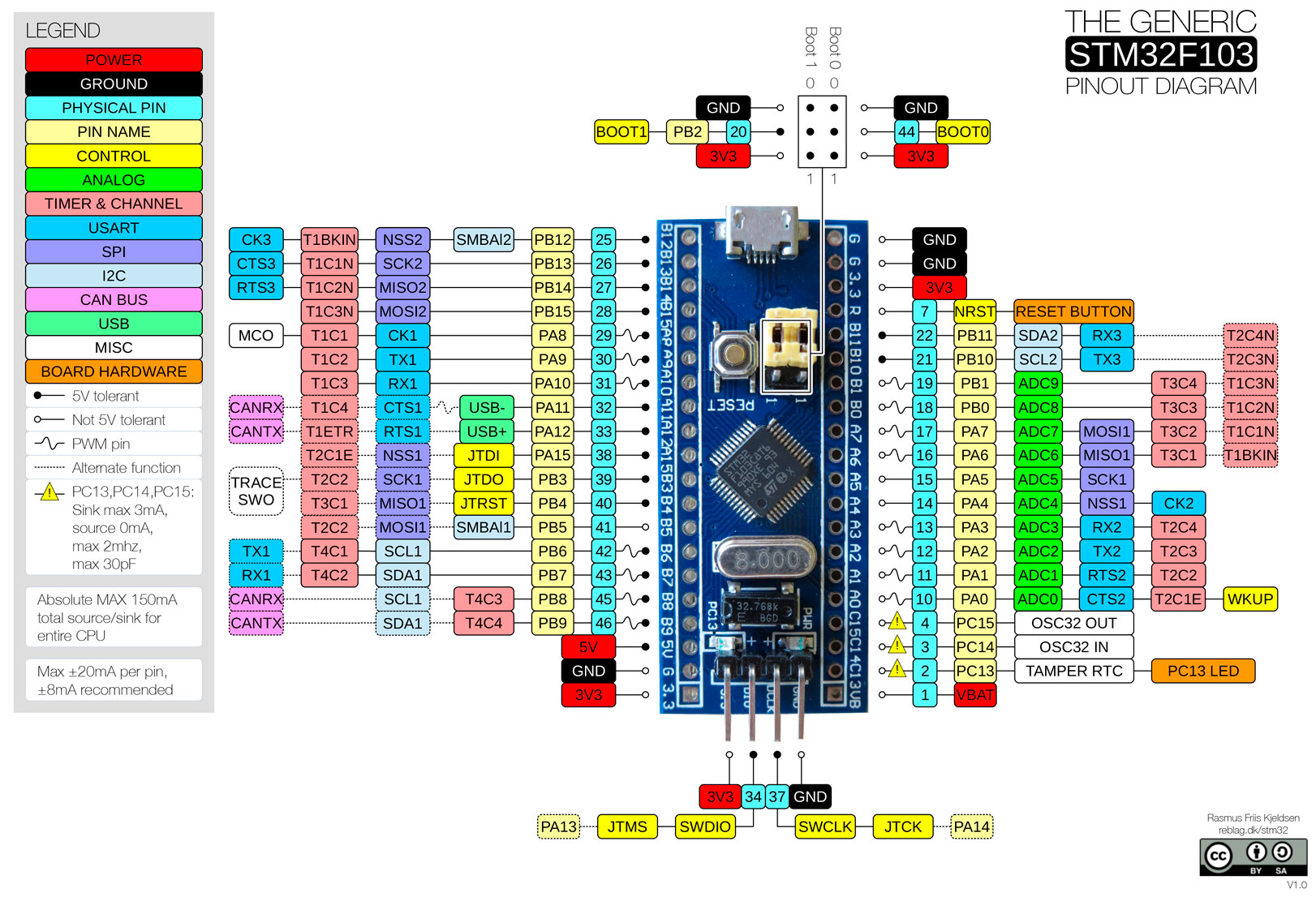
 ![The-Generic-STM32F103-Pinout-Diagram](https://forum.ficusonline.com/uploads/default/original/2X/d/d98ee7de9804789f11b48c26dac689f5e4a4431d.jpeg)

---

<div class="post-metadata">

### Author: ![tk-fuse](https://forum.ficusonline.com/user_avatar/forum.ficusonline.com/tk-fuse/32/255_2.png) [@tk-fuse](https://forum.ficusonline.com/u/tk-fuse)
#### Post date: [2026 年 10 月 9 日午前 6:45 UTC](https://forum.ficusonline.com/t/topic/568/9 "2026-10-09T06:45:02Z")

</div>

## 適正受信感度

> 注）法規制の注意  
> 920MHz 帯は特定小電力無線として使えますが、次の点に注意。
> 
> - 技適（工事設計認証）取得したモジュールを使う必要があります。SX1262 の素のチップではなく、 **DX-LR30 のような技適取得済みモジュール** で、取得時の構成（アンテナ含む）のまま使うことが前提です。
> - 920MHz 帯には送信時間制限（デューティ）、キャリアセンス（LBT）、チャンネル幅、出力の規定があります。[ARIB STD-T108](https://www.arib.or.jp/kikaku/kikaku_tushin/desc/std-t108.html) を確認してください。

ゲートウェイとノードを一対一接続した場合の目安

| 項目 | 値 |
| --- | --- |
| 周波数 | 920MHz帯 |
| SF | 9 |
| 帯域幅 | 125kHz |
| 送信出力 | 13dBm（約20mW） |

| 環境 | 到達距離の目安 |
| --- | --- |
| 見通しの良い屋外 | 2〜5km |
| 住宅街（屋外同士） | 300m〜1km |
| 住宅街（片方が屋内） | 100〜400m |
| 鉄筋コンクリート建物内（壁・階をまたぐ） | 数十m〜100m 程度 |

RSSI が -95dBm 程度まで

---

<div class="post-metadata">

### Author: ![tk-fuse](https://forum.ficusonline.com/user_avatar/forum.ficusonline.com/tk-fuse/32/255_2.png) [@tk-fuse](https://forum.ficusonline.com/u/tk-fuse)
#### Post date: [2026 年 10 月 14 日午後 12:45 UTC](https://forum.ficusonline.com/t/topic/568/10 "2026-10-14T12:45:12Z")

</div>

## トラブルシュート

onOff スイッチ: Type Boolean  
バブリッシュされる値は`true/false`  
トピックは`1/0`で反応するため変換。

> **[Write Value Converter: Convert Boolean Switch to 0/1 for MQTT](https://forum.openremote.io/t/write-value-converter-convert-boolean-switch-to-0-1-for-mqtt/3962)**
>
> Hi everyone, I’m trying to use the Write Value Converter in OpenRemote so that a UI switch sends 0 or 1 to an MQTT topic. Desired behavior: Switch ON (true) → publish "1" Switch OFF (false) → publish "0" My current attribute configuration: { ...

 ![Screenshot from 2026-10-14 21-46-22](https://forum.ficusonline.com/uploads/default/original/2X/a/a86d904bd5b3296cf9fcf3d97087e0ddd2ea2acb.png)

- **Write Value Converter** : パブリッシュする値に対して適用

- **Value Converter** : サブスクライブする値に対して適用

* * *

### STM32：リセットスイッチエラー

 ![Screenshot from 2026-10-20 23-47-39](https://forum.ficusonline.com/uploads/default/original/2X/b/b194734e78e432efb58d70c331e76c84012e35d8.png)

 ![Screenshot from 2026-10-20 23-54-35](https://forum.ficusonline.com/uploads/default/original/2X/5/545a81aad83973c89dc8b78f5ee51a87e558df48.png)

- CH340C の DTR#/RTS# が NRST/BOOT0 に繋がっていて、PC のシリアルポートが閉じた状態だと、リセット後の起動が不安定になる
- アダプタ給電では DTR/RTS が動かないため、通常どおり起動する
- 通常の電源ON/OFFでは問題ない

---

<div class="post-metadata">

### Author: ![tk-fuse](https://forum.ficusonline.com/user_avatar/forum.ficusonline.com/tk-fuse/32/255_2.png) [@tk-fuse](https://forum.ficusonline.com/u/tk-fuse)
#### Post date: [2026 年 10 月 16 日午前 2:49 UTC](https://forum.ficusonline.com/t/topic/568/11 "2026-10-16T02:49:29Z")

</div>

## アセットの設定

調光LED照明

 ![Screenshot from 2026-10-16 11-01-39](https://forum.ficusonline.com/uploads/default/original/2X/3/3fa273f7c3a84b58396ceb100d40476e95d032e6.png)  
 ![Screenshot from 2026-10-16 11-02-06](https://forum.ficusonline.com/uploads/default/original/2X/f/f1bba724d82d43600def6f638194c27ca82947c5.png)

Value Converter（サブスクライブに適用）

```auto
{
  "ON": 1,
  "OFF": 0
}

```

Value Filters（サブスクライブに適用。JSONフォーマットのデータの一部を抽出）

```auto
[
  {
    "type": "jsonPath",
    "path": "$.POWER",
    "returnFirst": false,
    "returnLast": true
  }
]

```

---

<div class="post-metadata">

### Author: ![tk-fuse](https://forum.ficusonline.com/user_avatar/forum.ficusonline.com/tk-fuse/32/255_2.png) [@tk-fuse](https://forum.ficusonline.com/u/tk-fuse)
#### Post date: [2026 年 10 月 17 日午前 8:02 UTC](https://forum.ficusonline.com/t/topic/568/12 "2026-10-17T08:02:06Z")

</div>

## マーカーのカスタマイズ

`Appearance ---> REALME STYLING ---> JSON`

 ![Screenshot from 2026-10-17 16-58-57](https://forum.ficusonline.com/uploads/default/original/2X/b/b46e713d05231241b073530f750fa5f905830b04.png)

アセットであるセンサやLEDなどのON/OFFによりマーカーの色を変更。

> **[Appearance Page | OpenRemote Documentation](https://docs.openremote.io/docs/user-guide/manager-ui/appearance/)**
>
> Configuring the Manager UI

```auto
 "pages": {
    "map": {
      "markers": {
        "LightAsset": {
          "attributeName": "onOff",
          "showLabel": true,
          "showUnits": false,
          "colours": {
            "type": "boolean",
            "true": "FFD700",
            "false": "808080"
          }
        },
        "PresenceSensorAsset": {
          "attributeName": "presence",
          "showLabel": true,
          "showUnits": false,
          "colours": {
            "type": "boolean",
            "true": "39B54A",
            "false": "C1272D"
          }
        },
        "WeatherAsset": {
          "attributeName": "windSpeed",
          "showLabel": true,
          "showUnits": true,
          "colours": {
            "type": "range",
            "ranges": [
              {
                "min": 0,
                "colour": "39B54A"
              },
              {
                "min": 10,
                "colour": "F7931E"
              },
              {
                "min": 20,
                "colour": "C1272D"
              }
            ]
          }
        }

```

 ![Screenshot from 2026-10-17 17-01-43](https://forum.ficusonline.com/uploads/default/original/2X/4/466647874bfb33a40f2c1ca71ca65f8c419e15fa.png)

* * *

Insights —\> ダッシュボードではウィジットのマップで色指定

 ![Screenshot from 2026-10-17 17-05-09](https://forum.ficusonline.com/uploads/default/original/2X/b/b884d2064051b96bdcd03c14dd60cf04d4051211.png)

---

<div class="post-metadata">

### Author: ![tk-fuse](https://forum.ficusonline.com/user_avatar/forum.ficusonline.com/tk-fuse/32/255_2.png) [@tk-fuse](https://forum.ficusonline.com/u/tk-fuse)
#### Post date: [2026 年 10 月 24 日午前 12:54 UTC](https://forum.ficusonline.com/t/topic/568/13 "2026-10-24T00:54:02Z")

</div>

### ソースコード: GitHub

> **[GitHub - capitalfuse/lora-project: lora network system with STM32F103C8 + DX-LR30...](https://github.com/capitalfuse/lora-project)**
>
> lora network system with STM32F103C8 + DX-LR30 (SX1262) + BMI160 (for Senser Node) + ESP32-C6 (for Gateway) + LED (Used for Actuator Node) . Managed this system by OpenRemote.

```auto
$ git config -l # 登録ユーザ名とメールアドレス確認
$ gh auth login # GitHub CLI

```

GitHubへプッシュ

```auto
$ cd lora-project
$ git init -b main
$ git add .
$ git commit -m "Initial commit"
$ gh repo create lora-project --public --source=. --remote=origin --push \
  --description "LoRa (920 MHz) mesh for sensors and relay control: STM32F103 + SX1262 with an ESP32-C6 MQTTS gateway"

```

確認

```auto
$ git remote -v
$ git status -sb
$ gh repo view --web

```

タグ追加

```auto
$ git tag v0.1.0
$ git push origin v0.1.0

```
