docker-compose.yaml
services:
##### Memcached
  memcached:
    container_name: memcached
    image: memcached:alpine
    ports:
      - 127.0.0.1:11211:11211
    command:
      - --conn-limit=1024
      - --memory-limit=64
      - --threads=4
    restart: unless-stopped
    networks:
      fusionpbx-net:
        ipv4_address: 10.xx.xx.2
        ipv6_address: fdxx:xxxx:xxxx:xxxx::2

##### nginx
  nginx:
    container_name: nginx
    image: nginx:alpine
    tty: true
    volumes:
      # nginx config
      - ./resources/nginx:/etc/nginx/conf.d
      - ./letsencrypt:/etc/letsencrypt:ro
      # download fusionpbx : $ git clone $branch https://github.com/fusionpbx/fusionpbx.git
      - ./fusionpbx:/var/www/fusionpbx
      - ./nginx_log:/var/log/nginx
    restart: unless-stopped
    network_mode: "host"

##### postgresql https://hub.docker.com/_/postgres
  postgresql:
    container_name: postgresql
    image: postgres:17-alpine
    ports:
        - 127.0.0.1:5432:5432
    restart: unless-stopped
    # set shared memory limit when using docker compose
    shm_size: 128mb
    volumes:
      - ./db:/var/lib/postgresql
    environment:
      - POSTGRES_PASSWORD=${DATABASE_PASSWORD}
      - POSTGRES_USER=${DATABASE_USERNAME}
      - POSTGRES_DB=${DATABASE_NAME}
      - PGDATA=/var/lib/postgresql/17/docker
    networks:
      fusionpbx-net:
        ipv4_address: 10.xx.xx.4
        ipv6_address: fdxx:xxxx:xxxx:xxxx::4

### PHP-FPM(FusionPBX)
  php-fpm:
    container_name: php-fpm
    build:
      context: ./docker_files
      dockerfile: php-fpm-fusionpbx
    ### $ docker build -f $(pwd)/docker_files/php-fpm-fusionpbx -t php-8.2-fpm:20250817 $(pwd)/docker_files
    image: php-8.2-fpm:20250817
    volumes:
      #  Configuration File (php.ini) Path : /usr/local/etc/php
      - ./php-fpm_conf/php.ini:/usr/local/etc/php/php.ini
      - ./php-fpm_conf/supevisor.conf:/etc/supervisor/conf.d/supevisor.conf:ro
      - ./logs:/var/log/supervisor
      ### download fusionpbx : $ git clone $branch https://github.com/fusionpbx/fusionpbx.git
      ### optional
      ### $ git clone https://github.com/fusionpbx/fusionpbx-app-transcribe.git ./fusionpbx/app/transcribe
      ### $ git clone https://github.com/fusionpbx/fusionpbx-app-speech.git ./fusionpbx/app/speech
      ### $ git clone https://github.com/fusionpbx/fusionpbx-app-device_logs.git ./fusionpbx/app/device_logs
      ### $ git clone https://github.com/fusionpbx/fusionpbx-app-dialplan_tools.git ./fusionpbx/app/dialplan_tools
      ### $ git clone https://github.com/fusionpbx/fusionpbx-app-edit.git ./fusionpbx/app/edit
      ### $ git clone https://github.com/fusionpbx/fusionpbx-app-sip_trunks.git ./fusionpbx/app/sip_trunks
      ### chown -R www-data:www-data /var/www/fusionpbx /var/cache/fusionpbx /etc/freeswitch
      - ./fusionpbx:/var/www/fusionpbx
      - ./resources/fusionpbx/config.conf:/etc/fusionpbx/config.conf
      - ./fusionpbx/app/switch/resources/conf:/etc/freeswitch
      - ./fusionpbx/app/switch/resources/scripts:/usr/share/freeswitch/scripts
      - freeswitch_lib:/var/lib/freeswitch
      - freeswitch_usr_lib:/usr/lib/freeswitch
      - freeswitch_share:/usr/share/freeswitch
      - freeswitch_log:/var/log/freeswitch
      - freeswitch_run:/var/run/freeswitch
      - ./cache:/var/cache/fusionpbx
      ### https://github.com/fusionpbx/fusionpbx-install.sh/tree/master/debian/resources
      - ./resources:/opt/fusionpbx-installer-sh
    depends_on:
      - freeswitch
    restart: unless-stopped
    network_mode: "host"

### FreeSwitch
  freeswitch:
    container_name: freeswitch
    #### $ docker build -f $(pwd)/docker_files/freeswitch_master/Dockerfile -t freeswitch:20250817 $(pwd)/docker_files/freeswitch_master
    build:
      context: ./docker_files/freeswitch_master
      dockerfile: Dockerfile
    image: freeswitch:20250817
    volumes:
      - ./letsencrypt:/etc/freeswitch/tls
      - ./resources/fusionpbx/config.conf:/etc/fusionpbx/config.conf
      - ./fusionpbx/app/switch/resources/conf:/etc/freeswitch
      - ./fusionpbx/app/switch/resources/scripts:/usr/share/freeswitch/scripts
      - ./tmp:/tmp
      - freeswitch_lib:/var/lib/freeswitch
      - freeswitch_usr_lib:/usr/lib/freeswitch
      - freeswitch_share:/usr/share/freeswitch
      - freeswitch_log:/var/log/freeswitch
      - freeswitch_run:/var/run/freeswitch
      - ./cache:/var/cache/fusionpbx
    depends_on:
      - nginx
      - postgresql
    restart: unless-stopped
    cap_add:
      - NET_ADMIN
      - SYS_RESOURCE
      - SYS_NICE
      - IPC_LOCK
    privileged: true
    network_mode: "host"

networks:
  fusionpbx-net:
    enable_ipv6: true
    ipam:
      driver: default
      config:
        - subnet: "10.xx.xx.0/24"
        - subnet: "fdxx:xxxx:xxxx:xxxx::/64"
volumes:
  freeswitch_lib:
  freeswitch_usr_lib:
  freeswitch_share:
  freeswitch_log:
  freeswitch_run:
php-fpmコンテナ内で以下のスクリプトfinish.shを実行(一度だけ)
$ docker compose exec php-fpm bash
# cd /opt/fusionpbx-installer-sh
# ./finish.sh
改訂:finish.sh
#!/bin/sh

#move to script directory so all relative paths work
cd "$(dirname "$0")"

#includes
. ./config.sh
. ./colors.sh

#database details
database_username=fusionpbx
if [ .$database_password = .'random' ]; then
	database_password=$(dd if=/dev/urandom bs=1 count=20 2>/dev/null | base64 | sed 's/[=\+//]//g')
fi

#allow the script to use the new password
export PGPASSWORD=$database_password

#update the database password
psql --host=$database_host --port=$database_port --username=$database_username -c "ALTER USER fusionpbx WITH PASSWORD '$database_password';"
psql --host=$database_host --port=$database_port --username=$database_username -c "ALTER USER freeswitch WITH PASSWORD '$database_password';"
#sudo -u postgres psql -c "ALTER USER fusionpbx WITH PASSWORD '$database_password';"
#sudo -u postgres psql -c "ALTER USER freeswitch WITH PASSWORD '$database_password';"

#install the database backup
# cp backup/fusionpbx-backup /etc/cron.daily
# cp backup/fusionpbx-maintenance /etc/cron.daily
# chmod 755 /etc/cron.daily/fusionpbx-backup
# chmod 755 /etc/cron.daily/fusionpbx-maintenance
# sed -i "s/zzz/$database_password/g" /etc/cron.daily/fusionpbx-backup
# sed -i "s/zzz/$database_password/g" /etc/cron.daily/fusionpbx-maintenance

#add the config.conf
# mkdir -p /etc/fusionpbx
# cp fusionpbx/config.conf /etc/fusionpbx
# sed -i /etc/fusionpbx/config.conf -e s:"{database_host}:$database_host:"
# sed -i /etc/fusionpbx/config.conf -e s:"{database_name}:$database_name:"
# sed -i /etc/fusionpbx/config.conf -e s:"{database_username}:$database_username:"
# sed -i /etc/fusionpbx/config.conf -e s:"{database_password}:$database_password:"

#add the database schema
cd /var/www/fusionpbx && /usr/local/bin/php /var/www/fusionpbx/core/upgrade/upgrade.php --schema

#get the server hostname
if [ .$domain_name = .'hostname' ]; then
	domain_name=$(hostname -f)
fi

#get the ip address
if [ .$domain_name = .'ip_address' ]; then
	domain_name=$(hostname -I | cut -d ' ' -f1)
fi

#get the domain_uuid
domain_uuid=$(/usr/local/bin/php /var/www/fusionpbx/resources/uuid.php);

#add the domain name
psql --host=$database_host --port=$database_port --username=$database_username -c "insert into v_domains (domain_uuid, domain_name, domain_enabled) values('$domain_uuid', '$domain_name', 'true');"

#run app defaults
cd /var/www/fusionpbx && /usr/local/bin/php /var/www/fusionpbx/core/upgrade/upgrade.php --defaults

#add the user
user_uuid=$(/usr/local/bin/php /var/www/fusionpbx/resources/uuid.php);
user_salt=$(/usr/local/bin/php /var/www/fusionpbx/resources/uuid.php);
user_name=$system_username
if [ .$system_password = .'random' ]; then
	user_password=$(dd if=/dev/urandom bs=1 count=20 2>/dev/null | base64 | sed 's/[=\+//]//g')
else
	user_password=$system_password
fi
password_hash=$(/usr/local/bin/php -r "echo md5('$user_salt$user_password');");
psql --host=$database_host --port=$database_port --username=$database_username -t -c "insert into v_users (user_uuid, domain_uuid, username, password, salt, user_enabled) values('$user_uuid', '$domain_uuid', '$user_name', '$password_hash', '$user_salt', 'true');"

#get the superadmin group_uuid
#echo "psql --host=$database_host --port=$database_port --username=$database_username -qtAX -c \"select group_uuid from v_groups where group_name = 'superadmin';\""
group_uuid=$(psql --host=$database_host --port=$database_port --username=$database_username -qtAX -c "select group_uuid from v_groups where group_name = 'superadmin';");

#add the user to the group
user_group_uuid=$(/usr/local/bin/php /var/www/fusionpbx/resources/uuid.php);
group_name=superadmin
#echo "insert into v_user_groups (user_group_uuid, domain_uuid, group_name, group_uuid, user_uuid) values('$user_group_uuid', '$domain_uuid', '$group_name', '$group_uuid', '$user_uuid');"
psql --host=$database_host --port=$database_port --username=$database_username -c "insert into v_user_groups (user_group_uuid, domain_uuid, group_name, group_uuid, user_uuid) values('$user_group_uuid', '$domain_uuid', '$group_name', '$group_uuid', '$user_uuid');"

#update xml_cdr url, user and password
xml_cdr_username=$(dd if=/dev/urandom bs=1 count=20 2>/dev/null | base64 | sed 's/[=\+//]//g')
xml_cdr_password=$(dd if=/dev/urandom bs=1 count=20 2>/dev/null | base64 | sed 's/[=\+//]//g')
sed -i /etc/freeswitch/autoload_configs/xml_cdr.conf.xml -e s:"{v_http_protocol}:http:"
sed -i /etc/freeswitch/autoload_configs/xml_cdr.conf.xml -e s:"{domain_name}:$database_host:"
sed -i /etc/freeswitch/autoload_configs/xml_cdr.conf.xml -e s:"{v_project_path}::"
sed -i /etc/freeswitch/autoload_configs/xml_cdr.conf.xml -e s:"{v_user}:$xml_cdr_username:"
sed -i /etc/freeswitch/autoload_configs/xml_cdr.conf.xml -e s:"{v_pass}:$xml_cdr_password:"

#update application defaults
cd /var/www/fusionpbx && /usr/local/bin/php /var/www/fusionpbx/core/upgrade/upgrade.php --defaults

#update permissions
cd /var/www/fusionpbx && /usr/local/bin/php /var/www/fusionpbx/core/upgrade/upgrade.php --permissions

#restart freeswitch
#/bin/systemctl daemon-reload
#/bin/systemctl restart freeswitch

#make the /var/run directory and set the ownership
# mkdir -p /var/run/fusionpbx
# chown -R www-data:www-data /var/run/fusionpbx

#install the services
#cd /var/www/fusionpbx && /usr/local/bin/php /var/www/fusionpbx/core/upgrade/upgrade.php --services

#install crontab
#apt install cron

#welcome message
echo ""
echo ""
verbose "Installation Notes. "
echo ""
echo "   Please save this information and reboot this system to complete the install. "
echo ""
echo "   Use a web browser to login."
echo "      domain name: https://$domain_name"
echo "      username: $user_name"
echo "      password: $user_password"
echo ""
echo "   The domain name in the browser is used by default as part of the authentication."
echo "   If you need to login to a different domain then use username@domain."
echo "      username: $user_name@$domain_name";
echo ""
echo "   Official FusionPBX Training"
echo "      Fastest way to learn FusionPBX. For more information https://www.fusionpbx.com."
echo "      Available online and in person. Includes documentation and recording."
echo ""
echo "      Location:               Online"
echo "      Admin Training:          TBA"
echo "      Advanced Training:       TBA"
echo "      Continuing Education:   https://www.fusionpbx.com/training"
echo "      Timezone:               https://www.timeanddate.com/weather/usa/idaho"
echo ""
echo "   Additional information."
echo "      https://fusionpbx.com/members.php"
echo "      https://fusionpbx.com/training.php"
echo "      https://fusionpbx.com/support.php"
echo "      https://www.fusionpbx.com"
echo "      http://docs.fusionpbx.com"
echo ""

# pgpassword security and conflict avoidance
unset PGPASSWORD
オプションアプリのインストールについて
resources/applications.sh (このスクリプトからはインストールしません)
#optional applications
cd /var/www/fusionpbx/app
if [ .$application_transcribe = .'true' ]; then
	git clone https://github.com/fusionpbx/fusionpbx-app-transcribe.git transcribe
fi
if [ .$application_speech = .'true' ]; then
	git clone https://github.com/fusionpbx/fusionpbx-app-speech.git speech
fi
if [ .$application_device_logs = .'true' ]; then
	git clone https://github.com/fusionpbx/fusionpbx-app-device_logs.git device_logs
fi
if [ .$application_dialplan_tools = .'true' ]; then
	git clone https://github.com/fusionpbx/fusionpbx-app-dialplan_tools.git dialplan_tools
fi
if [ .$application_edit = .'true' ]; then
	git clone https://github.com/fusionpbx/fusionpbx-app-edit.git edit
fi
if [ .$application_sip_trunks = .'true' ]; then
	git clone https://github.com/fusionpbx/fusionpbx-app-sip_trunks.git sip_trunks
fi
chown -R www-data:www-data /var/www/fusionpbx
docker-composeファイルでコメントした各オプションアプリについては、ダウンロード後以下の作業を行うこと。
$ docker compose exec php-fpm bash
# chown -R www-data:www-data /var/www/fusionpbx/app/****
FusionPBXの作業画面から以下の2項目をチェックして実行
Run Advanced > Upgrade > Menu Defaults
Run Advanced > Upgrade > Permission Defaults
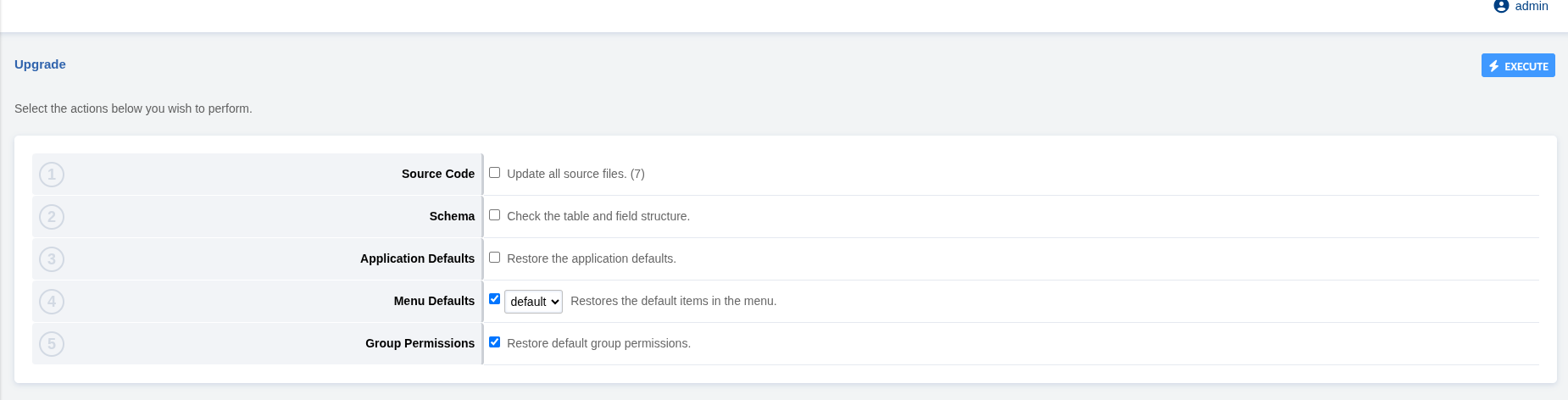
再ログインして有効になります。